


A database reactivation is the cheapest pipeline you will ever build. You already paid to get those leads. They raised their hand once, then they either went quiet, or you got busy. A good database reactivation campaign sends them one well-timed message and lets an AI sales agent handle every reply and followup, around the clock, until they book.
We recently ran a live, start-to-finish AI database reactivation build with Ruheene Jaura, co-founder and CEO of Brandpod, in front of the CloseBot community. In about 30 minutes we went from a blank HighLevel workflow to a published agent ready to work 2,500 warm leads. This post walks through every decision we made, why we made it, and the data behind it, so you can run the same playbook on your own dead leads or a client’s.
What is database reactivation?
Database reactivation (often shortened to DBR, and also called lead reactivation) is a campaign that re-engages old contacts in your CRM who showed interest but never bought. Or maybe they did buy and you want to see if they are interested in a new offer you have.
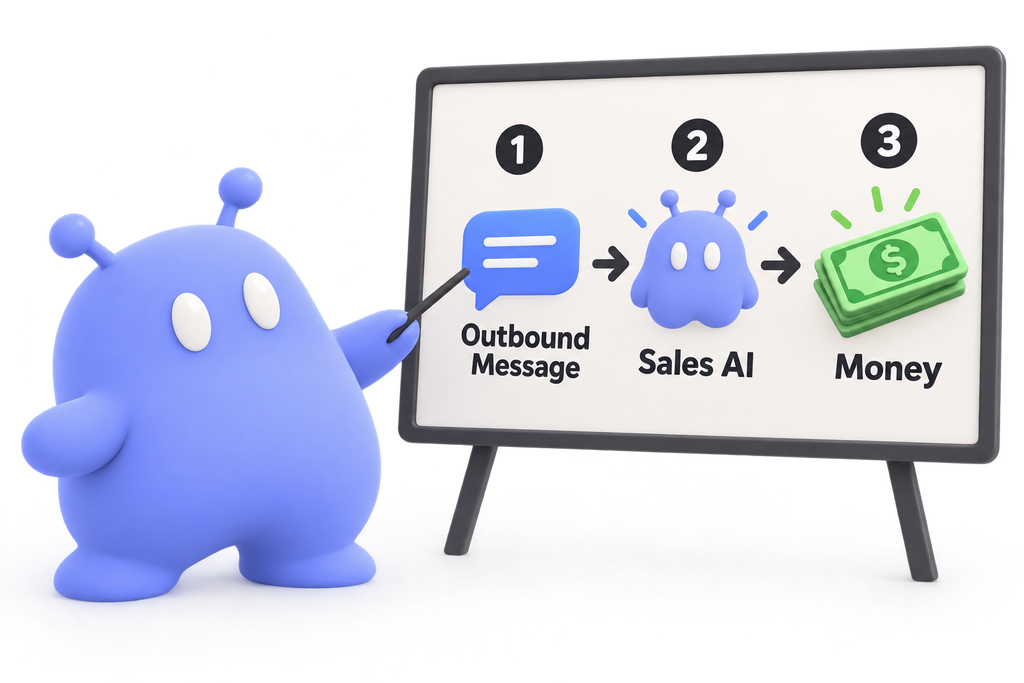
You send them a short outbound message, usually by SMS, and then qualify and book the people who reply. With AI, a sales agent handles those replies automatically: answering questions, sharing availability, booking appointments, and following up when a conversation goes quiet.
Database reactivation statistics (2026)
A healthy AI database reactivation books 2% to 5% of the contacts you message. CloseBot processes more than 150,000 messages a day, and we study anonymized, aggregate trends across that volume (never individual message contents) to tune the platform for everyone. Here is what that data, and our own campaigns, show.
| Statistic | Figure | Source |
|---|---|---|
| Typical booking rate on a reactivated list | 2% to 5% of contacts messaged | CloseBot platform data |
| Reply rate on our own reactivation | 40.5% (602 of 1,486 contacts) | Our own reactivation results |
| Booking rate on our own reactivation | 2.8% (41 demos in 9 days) | Same campaign |
| Responders who replied to the first text | 38% | Same campaign |
| Messages needed to get a reply, on average | 2 | Same campaign |
| Booked contacts who needed a follow-up first | 25% | Same campaign |
| Lowest-engagement day of the week | Friday | CloseBot aggregate data |
| Longest gap from first contact to booking | Just under 1 year | CloseBot aggregate data |
| Safe daily volume on a seasoned A2P number | Up to about 500 texts | CloseBot guidance |
| Small warm list, coaching offer | ~$1,000 new MRR in 10 days from 200 to 300 leads | Eric’s case study |
Two takeaways matter most. First, send more than one message: almost two thirds of the people who eventually replied to us ignored the first text. Second, give follow-ups a long runway, because some leads book months later. For a home services example, see how one roofer turned dead leads into $100k in roofing work.
The live build: Brandpod’s 2,500 warm leads
Brandpod helps founders and innovators get booked on podcasts, stages, and in industry publications, using AI agents that match a person’s story to the right opportunities. Over its first year, Brandpod collected interested contacts from a live webinar, HighLevel’s Level Up event, Ruheene’s speaking engagements and podcast appearances, referral partners, and organic signups.
The goal was simple…
get those people on a call with the Brandpod team. That gave us a list of about 2,500 contacts, all warm, and one clear conversion event.
Part 1: Setting up the database reactivation campaign
Everything before a lead’s first reply happens in your CRM. We built this in HighLevel, and the same logic carries to HubSpot or any CRM that can send texts on a schedule.
1. Keep scraped lists out of your reactivation
Ruheene also had a list pulled from LinkedIn through an outreach tool. We left it out. Those people never asked to hear from Brandpod, so they would drag down reply rates and put a brand-new phone number at risk with the carriers. A database reactivation works because the contacts already know you. Only message people who gave you their information and consent to be contacted.
2. Let your CRM send the first message
CloseBot, like ChatGPT or Claude, does not send the first message. It replies. That leads some people to assume an AI agent can’t run a DBR, which is false. The first text comes from one simple CRM workflow, and the moment a contact replies, CloseBot takes over.
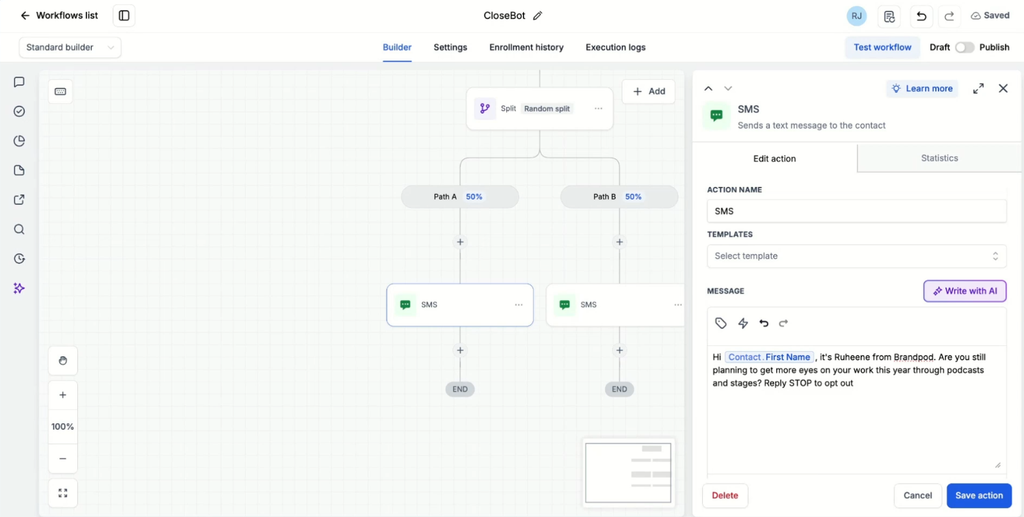
We built the workflow with no trigger at all. Contacts only enter when you add them by hand or in bulk, so nobody gets messaged by accident.
3. Configure the workflow before you build it
Three settings matter in the workflow’s Settings panel:
- Stop on Response: on. When a contact replies, they leave the workflow and the AI handles everything from there, including follow-ups.
- Specific sending window. We used 8:00 AM to 5:00 PM.
- Weekends on, Fridays off. Across CloseBot’s message volume, Friday is the lowest-engagement day of the week. If your list is small enough to burn through in a few weeks, skip it.
4. Do the drip math, and start slow
Carriers judge how much to trust a phone number by its history. A number with years of clean A2P history can send up to roughly 500 texts a day. Brandpod had just registered for A2P, so the carriers were watching closely.
If your phone number is newly registered with A2P, don’t push it. Start at 50 contacts per day.
We started at 50 contacts a day. At a 30% reply rate, that is about 15 live conversations a day: enough to learn what people actually ask, and few enough that nothing spirals before you can adjust. Testing gets you far, but only real conversations show you how the agent performs.
To set the drip, divide the minutes in your sending window by your daily volume:
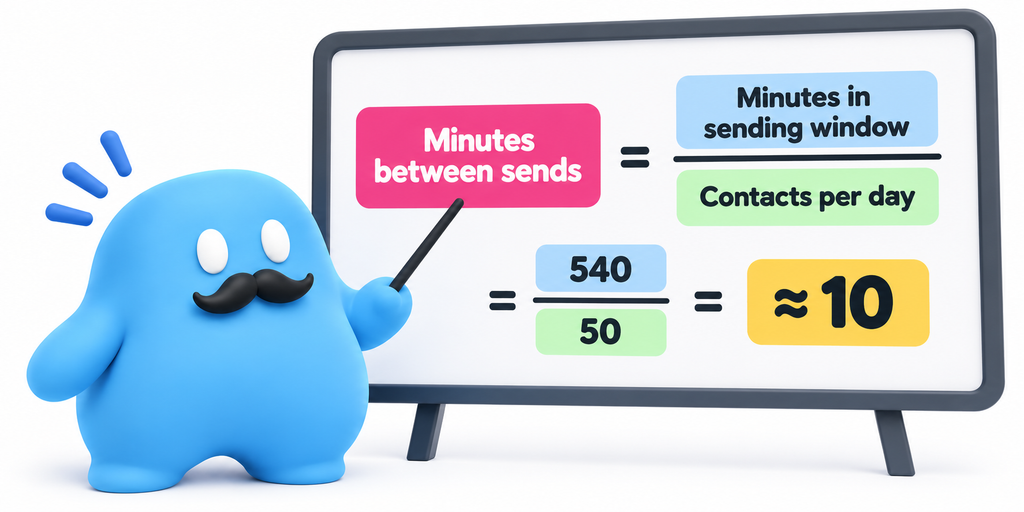
So the drip action sends a batch of 1 contact every 10 minutes. At 50 a day, Brandpod’s 2,500 contacts take about 10 weeks, and you can raise the pace once the number has a track record.
5. Tag every contact the workflow touches
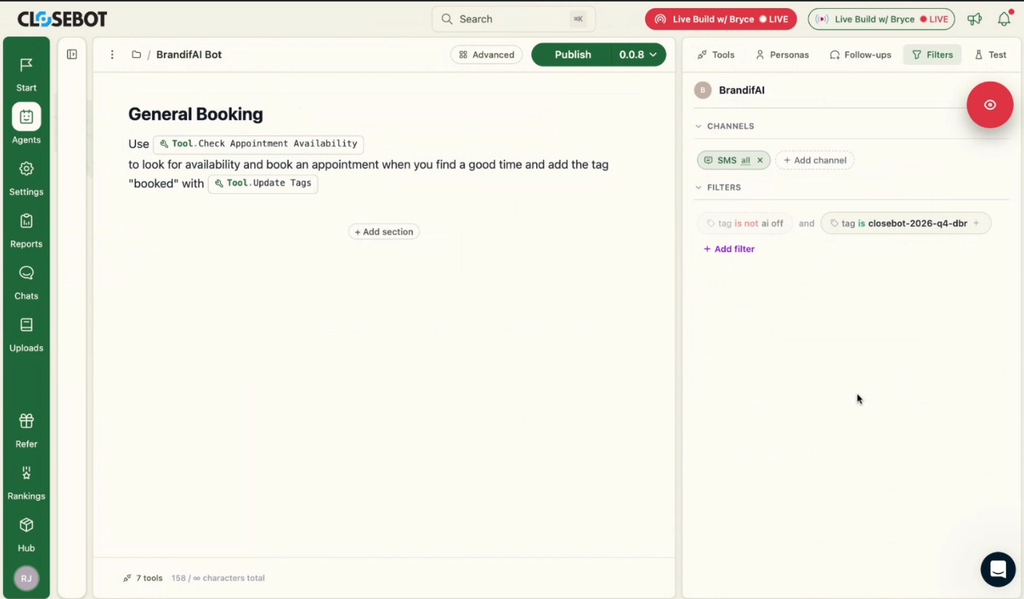
The next action adds a tag, such as “closebot 2026 q4 dbr” In CloseBot, the agent’s filter only replies to contacts with that tag. That keeps the agent out of every other conversation in the account and makes it easy to run separate reactivations later.
6. Write a first message that earns a reply
Ruheene’s draft: “Hi [first name], it’s Ruheene from Brandpod. Are you still planning to get more eyes on your work this year through podcasts and stages?”
It gets the fundamentals right. It uses their first name, names the business so they remember who you are, and ends with a question that is easy to answer.
The open question was whether to mention an offer (Brandpod’s $50 off any plan) in that first text. Leading with an offer usually lifts engagement. One community member suggested the opposite: ask a simple yes or no question first, then let the AI introduce the offer once they reply. A question feels like less of a commitment to answer. Both are reasonable, so test them. A Random Split action in the workflow lets you send different versions and compare.
7. Disclose AI where the law requires it
If you know an AI will be replying, some places require you to say so in the first message. The EU requires it, and a handful of US states have bot disclosure rules, with California’s being the best known. Brandpod’s list is mostly US-based with some international contacts, so the safest move is a disclosure line in the first text.
Expect a slightly lower reply rate when you disclose. A more advanced option is to split by region: a disclosure version for the EU and other regulated areas, and a standard version everywhere else. This is general guidance, not legal advice, so check the rules for where your contacts live.
Don’t skimp on compliance
8. Protect your SMS deliverability
If carriers are filtering your messages, two tactics help:
- Rotate your wording. A Random Split with several message variants looks far more natural to carriers than thousands of identical texts.
- Rotate your phone numbers. Create several team users in HighLevel, give each one its own number, and randomly assign them to contacts. When the Send SMS action runs, it uses the assigned user’s number, and CloseBot replies from that same number.
Brandpod’s volume didn’t need number rotation, but at high volume it can make a real difference.
9. Remember who owns the follow-up before the first reply
Until someone replies, follow-up is your CRM’s job. Add a Wait step and a second text if you want to nudge non-responders. Our data says you should: on average it took two messages to get a reply. Once someone replies, Stop on Response pulls them out of the workflow and the AI agent manages every follow-up from there, so no extra conditions are needed.
If you are comparing native CRM bots for this job, see CloseBot vs HighLevel Conversation AI.
Part 2: Building the AI database reactivation agent
Once a contact replies, the AI sales agent runs the conversation. After connecting Brandpod’s HighLevel sub-account to CloseBot, we scrapped the old agent and started fresh. Many of these choices apply to any AI agent, so they line up with our broader AI sales agent best practices.
10. Start with one agent and plain instructions
We built in CloseBot’s simple view: one agent with instructions and tools, no node diagram. A year ago, AI agents needed rigid step-by-step objectives (get the name, then the email, then move on). Models have improved enough that one well-written agent handles the whole conversation. We still recommend starting with a single agent and only splitting into multiple agents when one prompt gets unwieldy, like a contractor with separate roofing and plumbing qualification rules.
Using the Simple View isn’t any less powerful – even expert builders should try to use this view when possible
Write the instructions the way you would brief a virtual assistant sitting at your CRM. Keep them short and organized. Ours had two sections, General Information and Booking. When you want the agent to use a specific tool or field, name it directly in the instructions (in CloseBot, typing @ pulls up tools and variables). The agent might figure it out alone, but naming it removes the guesswork.
11. Give the agent only the tools the goal needs
The goal was booking calls, so we skipped qualification fields and turned on:
- Check availability, book, cancel, and reschedule appointments.
- Update contact, so it can save each lead’s time zone.
- Update tags, so it can tag a contact “human” when it needs help. Pair that tag with a CRM notification so someone gets pinged.
- Smart FAQ. When a lead asks something the knowledge base doesn’t cover, the agent says it doesn’t know instead of guessing, and alerts you. You fill in the answer once, and the agent follows up with that lead automatically.
- GIFs. On our own chat widget, an occasional GIF lifts engagement. We told the agent to use them only with excited, less formal leads.
- Web search. Useful when someone asks how you compare to a competitor. Watch it, though, since the top result could be a competitor’s own comparison page.
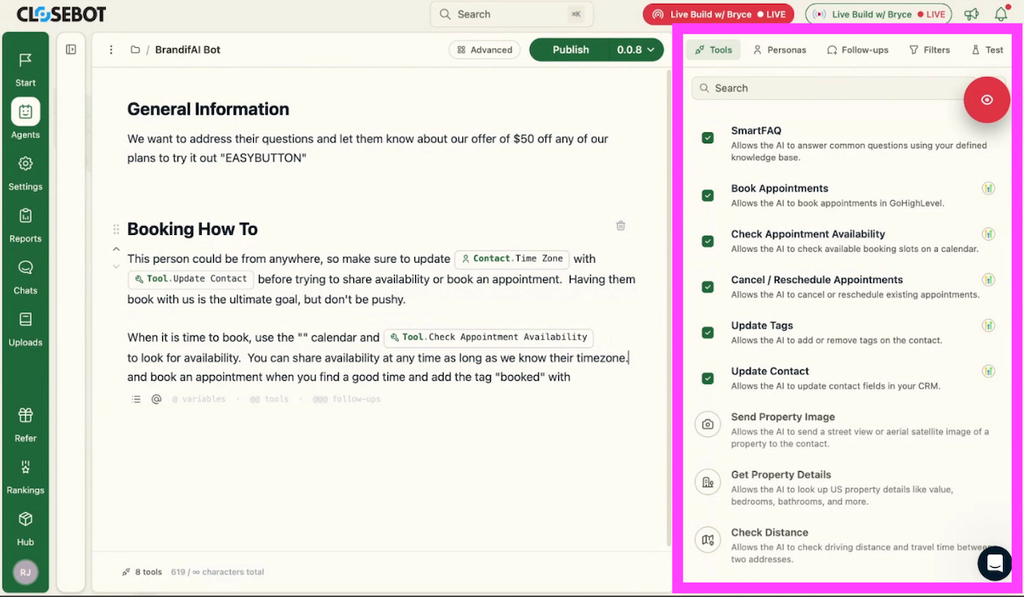
For knowledge, we used Brandpod’s scraped website pages. The agent pulls answers from them on its own, so the instructions only needed the details the website lacks: the offer ($50 off any plan) and the coupon code.
12. Save the lead’s time zone before sharing times
Reactivated lists are often spread across regions. Brandpod’s leads are mostly in the US with some abroad. We told the agent to update the contact’s time zone with the update contact tool before checking availability or booking. Without that, a lead in London gets offered Pacific time slots.
We also told it that booking is the goal, without being pushy, and that it can share availability at any time once it knows the time zone. That second rule matters even more when you qualify leads. Someone asking “do you have time tomorrow?” before answering a revenue question is more likely to answer once they see times that work for them.
⚠️ Don’t forget to collect and update the contact timezone before allowing your agent to check availability or schedule!
13. Route existing customers to the right calendar
Old databases mix prospects and customers. Ruheene realized some contacts were already Brandpod users who might need support rather than a sales call. One instruction handled it: if the contact is an existing user, tag them “existing user” and book them on the Customer Success calendar instead of the Talk To Us sales calendar. Agents in CloseBot route to as many calendars as you need.
14. Let the AI decide when to stop following up
This is where most reactivations leak revenue. In CloseBot we set two follow-up states:
- Follow up (the default): messages after 2 hours, 1 day, 4 days, 1 week, and 1 month of silence.
- No follow-up: for leads who clearly aren’t interested.
We made following up the default and told the agent to switch to no follow-up when a lead seems uninterested. You could add more states later, such as a faster cadence for leads who started booking and stalled. Start simple and add complexity only when the data shows a need.

How long to follow up is a cost trade-off. For a 2,500-person list, a month of follow-ups is cheap. For 100,000 contacts, years of scheduled follow-ups add up fast. Still, the record in our system between first contact and a booked appointment is just under a year, so don’t cut the runway too short.
15. Skip the awkward goodbye
You have seen this: the lead says “thanks, but no,” the bot says “no problem, best of luck,” the lead says “thanks,” the bot says “great talking to you,” and then the lead likes the message and the bot thanks them for liking it.
CloseBot can simply not reply. One line covers it: if replying would be awkward because they are saying goodbye or liking a message, don’t respond. Something as simple as this makes a huge impact on the effectiveness of your agents. This is why CloseBot’s focus alone will yield better results than using an all-in-one system.
16. Test, then publish
We ran test conversations in CloseBot’s testing portal. When the test lead said “No, thanks,” the agent switched follow-ups to none and didn’t drag the conversation out. When a lead asked to book, it updated the time zone, checked the calendar, offered times conversationally, and shared the coupon code.
In testing the agent doesn’t see your first text, but in production it reads the full thread, including the reactivation message and any earlier history. The agent only goes live when you publish.
The agent only goes live when you publish.
Part 3: Measuring your database reactivation, then reusing the agent
17. Build a dashboard before the first contact goes out
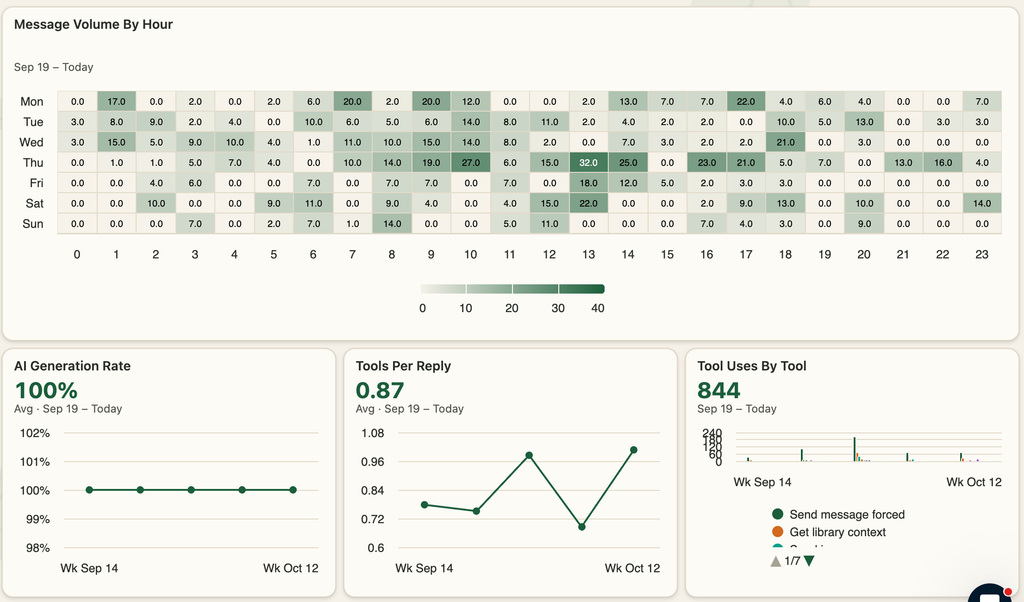
You can’t improve a reactivation you can’t see. CloseBot’s sales agent analytics start every account with a lead funnel showing contacts engaged, contacts the AI responded to, bookings, and contacts with a follow-up scheduled. For Brandpod we added:
- AI replies over time
- Follow-ups sent over time
- A KPI card for bookings in the past week
- Spend over time
That gives you one place to check whether the campaign is working, instead of A/B testing and guessing. Watch the reply rate in the first week, then the booking rate. If replies are healthy but bookings lag, read the conversations and adjust the instructions or fill knowledge gaps.
18. Reuse the same agent everywhere
Ruheene’s next question was whether her website chat needed a separate agent. It doesn’t. We added a section to the instructions that applies only when the contact has the reactivation tag, and another that applies when the conversation comes in through the site widget (CloseBot has a channel variable for this). Once the widget is live, remove the tag filter so the agent replies across SMS and chat. One agent, one set of instructions, every channel.
Run your own database reactivation
The whole build took about 30 minutes, explanations included. After publishing, the only step left was adding Brandpod’s contacts to the workflow. Your old leads are already in your CRM. A database reactivation is the fastest way to turn them back into booked calls.
- Watch our full DBR webinar for more reactivation strategy
- Sign up free and build this agent yourself
- Or have our team build it for you
Database reactivation FAQ
A reactivation campaign is outreach to contacts who have gone inactive, with the goal of getting them to engage or buy again. A database reactivation (or lead reactivation) targets leads who never converted. A customer reactivation campaign targets past customers who stopped buying. Both work the same way: a short outbound message, then fast, personal handling of every reply.
On warm, consented lists, expect roughly 30% to 40% of contacts to reply over a multi-message sequence and 2% to 5% to book. Our own campaign hit a 40.5% reply rate and a 2.8% booking rate. Older or lower-quality lists will land lower.
It depends on your phone number’s history. A new A2P registration should start around 50 a day and ramp up. A seasoned number can often handle up to about 500 a day. Spread sends evenly across your sending window rather than blasting them at once.
With CloseBot, your CRM sends the first message through a simple workflow, and the AI takes over the moment a contact replies. That keeps outbound volume under your control and the AI focused on conversations.
In some places, yes. The EU and a few US states require disclosure when an AI is communicating with people. If you know AI will reply, disclosing in the first message is the safest default. Check the rules where your contacts live.
Long enough to catch slow buyers. We used 2 hours, 1 day, 4 days, 1 week, and 1 month after a lead goes quiet, with the AI switching follow-ups off for uninterested leads. Some CloseBot leads have booked nearly a year after first contact.
Any business with a backlog of unconverted leads: home services, real estate, coaching, SaaS, and agencies running reactivations for clients. The bigger and warmer the list, the bigger the return.