


TL;DR
- I rebuilt Patrick Allmond’s AI setter live on a public call. These are the AI sales agent best practices we applied, in the order we hit them. Check out the video if you’d rather watch the build instead of read about it.
- Qualification is not a questionnaire. Split “would make me say no” from “nice to know,” and let only the first list gate a booking.
- Let the bot offer times before the lead is qualified. Availability creates momentum. Withholding it to protect your calendar costs you replies.
- Never tell an AI to “update stuff.” Name the exact fields, or it will guess and write to the wrong one, exactly like a new hire would.
- Filter who the bot talks to with tags, not prompt instructions. Anything you can make deterministic, make deterministic.
- Follow-up needs states, not a cadence. If you set the follow-up rules and they stay the same, you’ll cringe when it starts following up with leads that were obviously not interested.
- When you don’t like the tone, change the model before you add persona settings.
The 14 Decisions That Separate an AI Setter That Books From One That Annoys People
Patrick Allmond has been in the GoHighLevel world roughly since there was one. He runs StopDoingNothing Media, one of the original HL-certified agencies, a YouTube channel, and a community he calls the Playmakers. He’d known about CloseBot for years and had been actually using it for about five days.
I saw him introduce himself in our community and jumped at the chance to build his bot for him live on a call to make sure CloseBot was the success he needed. His real business on the line.
What made it worth writing up is that his bot was already working before we started. He’d wired it up on a free account, pointed his Facebook lead forms at it, and gone to bed.
CloseBot was on it before I even knew it
It was also already chatting with his friends. Patrick DMs with friends on Instagram all day. One of them sent him something funny. The AI sales agent replied that it was hilarious, then asked whether they’d like to book an appointment at 9am tomorrow.
Getting an AI sales agent to respond is easy. Getting it to respond to the right people, ask the right questions, and stop at the right time is the actual work, and almost none of it is technical.
How should you structure an AI sales agent?
Use one agent node, write its instructions in sections like an SOP, and give it only the tools its job requires. Complexity in the flow diagram is almost never what makes a bot better. Clarity in the instructions is.
1. Start with one agent node. People new to the Agent Node reach for the other node types immediately, because a bigger diagram feels like a better build. There are real reasons to branch, but if you’re starting, one node is all you need. Patrick’s flow had a separate “push to book appointment” node we deleted outright.
2. Write it in sections, like an SOP. I write agent instructions the way I’d write them for a virtual assistant starting Monday. How and when to book. How to qualify. How to follow up. One paragraph would also work, but you’re the one coming back in three months to change a threshold. Section headers are for you as much as for the AI.
3. Every tool you enable costs focus. Give an agent two tools and it will be relentlessly good at those two things. Give it eight and it starts improvising, sometimes delightfully, sometimes by re-tagging a contact nobody asked it to touch. We enabled availability, booking, field updates, tag updates, and Smart FAQ, and skipped the rest.
What should an AI sales agent ask to qualify a lead?
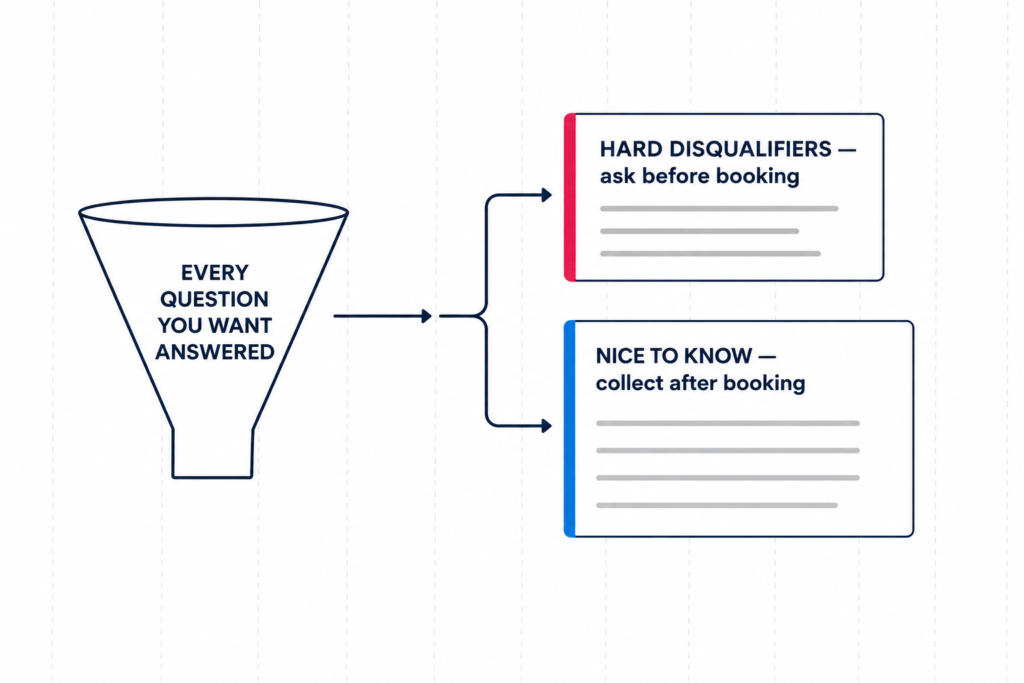
Only the questions whose answers could stop you from booking the call. Everything else belongs after the booking, or on the call itself.
When I asked Patrick how he qualifies, he did what almost everyone does: pulled up his pre-engagement form and started reading. Are you the decision maker? How will you know you got value? What’s your timeframe?
Then he stopped himself. “I’m not sure I’d call these qualification questions.” He was right, and the distinction is the whole game.
4. Separate hard disqualifiers from nice-to-knows. For each question ask: if they answer this the wrong way, do I refuse the call? If yes, the bot needs it before booking. If no, it’s context – collect it during booking or let a human get it. Patrick’s real disqualifiers came down to three:
- whether they’d commit a serious four-figure monthly ad budget
- whether they’re on HighLevel or open to moving to it
- whether they’re in his service region
Everything else he’d rather know than require.
5. Kill any question whose answer is always “yes.” Watching the bot ask about location during testing, Patrick said out loud: “I only run Facebook ads in the US. I’m not even sure that one’s needed.” He’d built that filter into his ad targeting years ago, then written it into his bot as well. Audit your qualifiers against your traffic sources and delete the ones your ad platform already answered.
6. Name your exact fields, and tell it to write as it collects. Say “update the fields when you have this information” and the agent will try. But Patrick’s account had a field called solution type that had nothing to do with our qualification set, and an agent told to “update stuff” can decide it looks relevant and overwrite it. Good intent, wrong column, CRM data quietly wrong… exactly the failure you’d get from a new hire.
So name the specific tool and the specific fields. Then add three words that matter more than they look: as you gather it. Without them, an agent often waits for the full set before writing anything, and a lead who answers two questions then ghosts leaves you with nothing.
7. Ask one or two questions at a time. Our first test reply stacked a multi-part question with four options in it. Technically efficient; conversationally it reads like a form. Two is usually the ceiling for SMS and DMs. If your AI is asking for all of the questions at once, or not enough at once… ask it to change how it responds. If that doesn’t work, try a different AI Provider (more on that below).
Should the bot offer times before the lead is qualified?
Yes. Let it check availability freely and gate only the actual booking. Availability creates momentum, and momentum is what gets you the information you were trying to collect.
The instinct is to protect the calendar: qualify first, reveal times second. Watch how differently those two land.
Withholding: “Amazing. Let me get your first and last name.”
Offering: “That’s awesome I’ve got tons of availability tomorrow, or one slot left at 5pm today. I just need your first and last name.”
Same request, very different reply rates. The second gives the lead something before asking for something, and gives them a reason to move now.
8. Let it check availability before the lead is qualified. Gate the booking itself instead of availability.
9. Tell it what you already know about the lead. CloseBot doesn’t ingest every custom field on a contact, on purpose… accounts have hundreds, and dumping them into context makes an agent worse. So if the lead form already captured a phone number and a stated pain point, the agent doesn’t know unless you say so. Add a short “we know the following” block, and put it in the global job information rather than the node, so it survives a hand-off to a second agent.
Where does the agent’s knowledge actually live?
Uploads get looked up when a lead asks a question. Job information is always in context and shapes every reply. Different jobs, and the same fact should never live in both.
Uploads are your resource library PDFs, a scraped site, a Drive folder. Job information is the flashcard taped to the desk of a virtual assistant about to start a shift. “In business since 1998.” “Family-run.” “White-glove, not volume.” Nobody has to ask for that to matter; it colors how every message gets written.
10. Keep one source of truth for each fact. Patrick asked whether overlap is a problem. It is, but not for the reason people expect: the model handles duplication fine, you don’t. Six months from now you’ll change your pricing, find it in one place, update it, and never remember it’s also in the other.
Who should your AI sales agent be allowed to talk to?
Decide it with tag filters at the source, not with instructions in the prompt. Anything you can make deterministic, make deterministic.
Back to Patrick’s friend getting offered a 9am. My first instinct was a prompt section explaining how to tell a friend from a prospect. It would have mostly worked, and mostly is doing a lot of load-bearing there.
Then I asked the question that made it unnecessary: does every real prospect arrive with a tag? Yes, off a Facebook ad, through a lead form, into HighLevel tagged. Does anyone DM him cold that he’d want the bot to answer? No. So we deleted the prompt section and set a source filter instead: reply only to contacts carrying the lead-form tag or the open-opportunity tag, never to ones carrying the kill-switch tag. His friends have none of those. The bot will never see them.
11. Filter with tags, not prompt instructions. A filter is code, it runs identically a thousand times. A prompt instruction is a judgment call you’re asking a model to make correctly on every message, forever. Keep a kill-switch tag any human or workflow can drop on a contact to silence the AI instantly. And if you genuinely do get mixed inbound with no reliable tag, then the prompt approach is right with the agent applying that kill-switch tag itself.
12. Draw the line between the AI’s job and a workflow’s job. Patrick asked how to tag someone who’s gone quiet for 48 hours. That’s not an AI job… there’s no judgment in it, just a timer and a condition, which is what CRM workflows exist for. The AI should own what requires reading a human being. That boundary is one of the clearest differences between a considered build and bolting AI onto a CRM because it was there.
How should AI follow-up actually work?
Fast first touch, tightening cadence, and a state the agent can switch into to stop entirely. The stopping rule matters more than the cadence.
Follow-up is where most builds quit and where most of the money is. Across 1.1 million appointments booked through CloseBot, just over half land outside 9-to-5. The lead who replies at 11pm gets a response or gets forgotten.
Patrick wanted immediate, then no more than 15 minutes, then longer, then out to a day. Good default for almost anyone. One channel note: Meta gives you a 24-hour window to message someone on Messenger or Instagram, so any longer cadence needs somewhere to go, if you captured a phone number, hop to SMS rather than die inside the window.
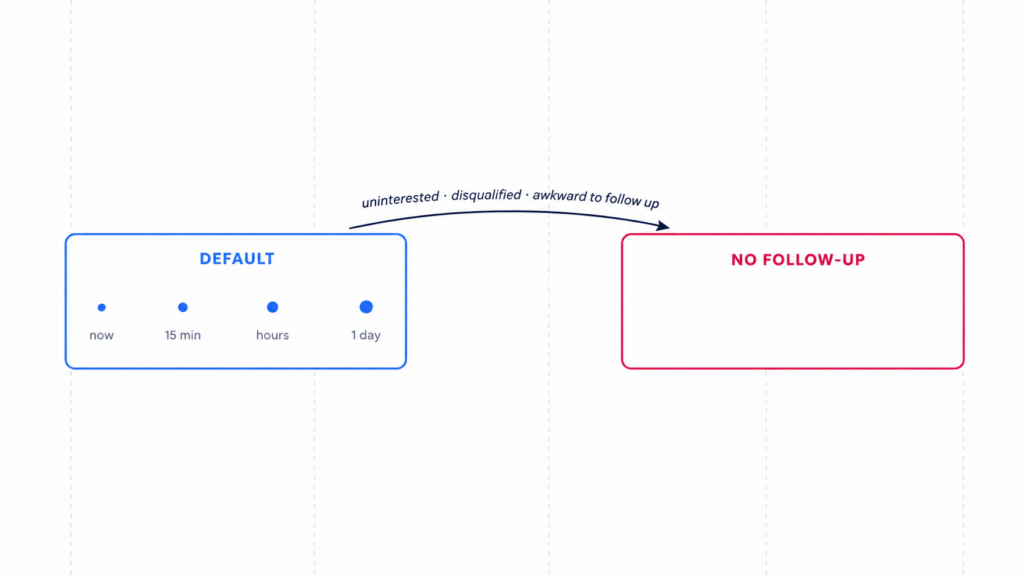
13. Build follow-up states, not one cadence. This is the decision I’d most want people to take away. A single cadence follows up with everyone identically, including the person who just said “I’m not interested, stop contacting me.” That’s how a good bot becomes a complaint.
So build a second state (no follow up) with nothing in it, and teach the agent when to switch:
As long as they are interested, keep the default follow-up. If they seem uninterested, are disqualified, or if it would be awkward to follow up, change to no follow-up.
“If it would be awkward to follow up” is doing real work there. It’s vague on purpose, the kind of judgment you’d trust a decent assistant to make without a rulebook, and it catches cases you’d never enumerate. We also had the agent tag disqualified leads. Not qualified ones; those tag themselves by booking.
How do you test an AI sales agent before it goes live?
With messages real leads actually sent you, not messages you imagine they’d send. The gap between those two is where builds fail.
The best move on the call cost nothing: I asked Patrick to pull up a live conversation from that morning and feed me the prospect’s actual words. What came back wasn’t tidy test dialogue. It was “tried a few agencies, they were no good.” Then, later, two words: “cost please.” That’s real inbound terse, skeptical, completely uninterested in the question you just asked.
14. Test with real messages, and change the model before you change the persona. Patrick didn’t like the first responses. My instinct wasn’t to add instructions but to look at what he’d already set: his persona was configured as relaxed and fun.
Modern models are already trained to be friendly and energetic. Stack “fun,” “energetic,” and “friendly” on top and you don’t get warmth, you get a bot doing an impression of warmth. So we did the other thing and switched the provider to Anthropic. Patrick’s reaction to the next reply was immediate: “I like this response a lot better.” Same instructions, same persona, different model.
Two things worth knowing exist while you tune. Thinking mode shows the agent’s reasoning before it replies, which turns “why did it do that” into a readable answer. And Smart FAQ builds your knowledge base from real questions: when the test hit “cost please,” the agent searched Patrick’s uploads, found no pricing, and logged the gap as a notification. He typed an answer, saved it, and it went live with the option to send it back to the lead who asked. Rather than guessing at an FAQ before launch, let your leads write it.
One thing we didn’t cover but that belongs in your test pass: confirm your first message discloses that it’s AI. That’s a legal requirement now in the EU and several US states, and in outbound-first setups the disclosure lives in your CRM template, not in your bot.
The habit that costs you the most
Patrick made an admission I suspect describes a lot of you: “If I’m bored, I’ll jump in a conversation manually. I need to stop doing that.”
He’s right, and not because human replies are worse. It’s that a human who jumps in at 4pm loses to a bot that replied at 11:04pm, and the moment you take the wheel, you’ve taken over the follow-up cadence too, which you will then forget about.
If you’re watching a conversation and know something the AI doesn’t, there’s a better move than taking over: drop a note on the contact. “I think this is Jimmy… we spoke by phone, we’re cutting him a deal, code 100OFF.” The agent reads it and keeps going. You’ve whispered in its ear instead of grabbing the keyboard.
None of these fourteen decisions is difficult. They’re just not obvious until someone’s watching you make them. If you want me to build yours on a Thursday, come say so or see how one went for a real estate investor with eight lead types first.
Frequently asked questions
Only the questions that could cause you to decline the call. Budget, tooling, and service area are usually hard qualifiers; decision-maker status, timeline, and pain point are usually context you can collect during booking or on the call itself. Every extra pre-booking question costs you a message and a chance for the lead to drop.
Yes. Let the agent check and share availability freely, and gate only the actual booking behind qualification. “I’ve got tons of availability tomorrow, or one slot left at 5pm – I just need your first and last name” outperforms asking for the same information cold, because it gives the lead something and a reason to move now.
Use tag-based source filters rather than prompt instructions. If every real prospect arrives carrying a tag from your lead form or CRM, tell the bot to reply only to contacts with that tag. A filter is deterministic; a prompt instruction is a judgment call the model has to get right on every message. Also keep a kill-switch tag any human can apply to silence the AI on a contact instantly.
A reasonable default is immediate, then within about 15 minutes, then a longer gap, then out to a day or more. What matters more than the intervals is a second state with no follow-ups at all, and instructing the agent to switch into it when a lead is uninterested, disqualified, or when following up would simply be awkward. On Messenger and Instagram, remember Meta’s 24-hour window – longer cadences need to move to SMS.
Usually because the persona is over-specified. Today’s models are already trained toward friendly and energetic, so adding “fun,” “energetic,” and “friendly” on top produces a caricature. Try removing persona instructions and switching the underlying model provider before you write more tone guidance – in this build, changing the provider fixed a tone problem no amount of prompting had.