


Most real estate AI software fails for the same boring reason. It treats every inbound lead the same.
A motivated seller with a vacant inherited house and a tire kicker replying to a rent-to-own listing are not the same conversation. Neither is the agent poking around, or the wholesaler pitching you a deal, or the cash buyer asking what else you have. Point one generic AI assistant at all of them and you get a bot that qualifies nobody well and annoys everybody equally.
Ryan runs a real estate investing business in the Pacific Northwest. Off-market sellers, tenant buyer prospects, cash buyers, agents, wholesalers, referral partners. Eight lead types hitting one inbox. He came to a live build assuming he needed a separate AI build for each one.
He didn’t. Here is the whole thing, start to finish, in about 50 minutes.
The real estate lead problem AI has to solve first
Before any qualification happens, real estate AI has to answer a question a human receptionist answers in four seconds: who is this?
Ryan’s words: “I get several different lead types, so I know I need some sort of receptionist system to help direct me to which one.”
His lead types are not equally valuable, and that is the whole point.
- Off-market sellers are his most valuable lead. Light qualification, real listening, fast handoff.
- Tenant buyer prospects are the highest volume and the biggest time drain. Every time he lists a rent-to-own or seller-financed property he gets a flood, and only five to ten percent have the down payment or monthly payment to be worth a conversation.
- Agents, wholesalers, cash buyers just need a reason-for-reaching-out summary passed along.
- Some types he does not want AI touching at all.
So the real estate AI agent needed three jobs: identify the lead, qualify it correctly for its type, and stay silent on the types that are not worth automating.
Keep every real estate lead in one CRM database
Ryan had split part of his business into a second GoHighLevel sub-account, mostly because unifying everything left him with custom fields that were irrelevant to most contacts. Seller fields on buyer records, buyer fields on seller records.
Not a good enough reason to split.
Every real estate CRM ends up with a messy field list. HubSpot ships with hundreds of fields you cannot delete, and every custom field you add is permanent. Field clutter is the normal state of a CRM. Fragmenting your database to avoid it costs you reporting, automation, and the ability to have one AI agent see the full picture of a contact who might be a seller today and a cash buyer next quarter.
Keep it unified. Live with the clutter.
Step 1: sync the contact type field to tags
Ryan’s CRM was organized around a contact type dropdown. CloseBot’s source filters read tags. Those two have to stay in sync, and the field stays the source of truth because everything else in his account already keys off it.
Ryan had built this himself before the call: when the contact type field changes, a HighLevel workflow strips the other type tags and adds the correct one. Tags like type-seller, type-tenant buyer prospect, type-agent.
That is exactly right. Abandoning the field to work purely in tags would have broken every automation he already had running.
Step 2: filters that catch the three real estate scenarios
With tags in sync, the reply rules get simple to state. The AI replies if:
- The contact is tagged
type-seller, or - The contact is tagged
type-tenant buyer prospect, or - The contact has none of the type tags at all
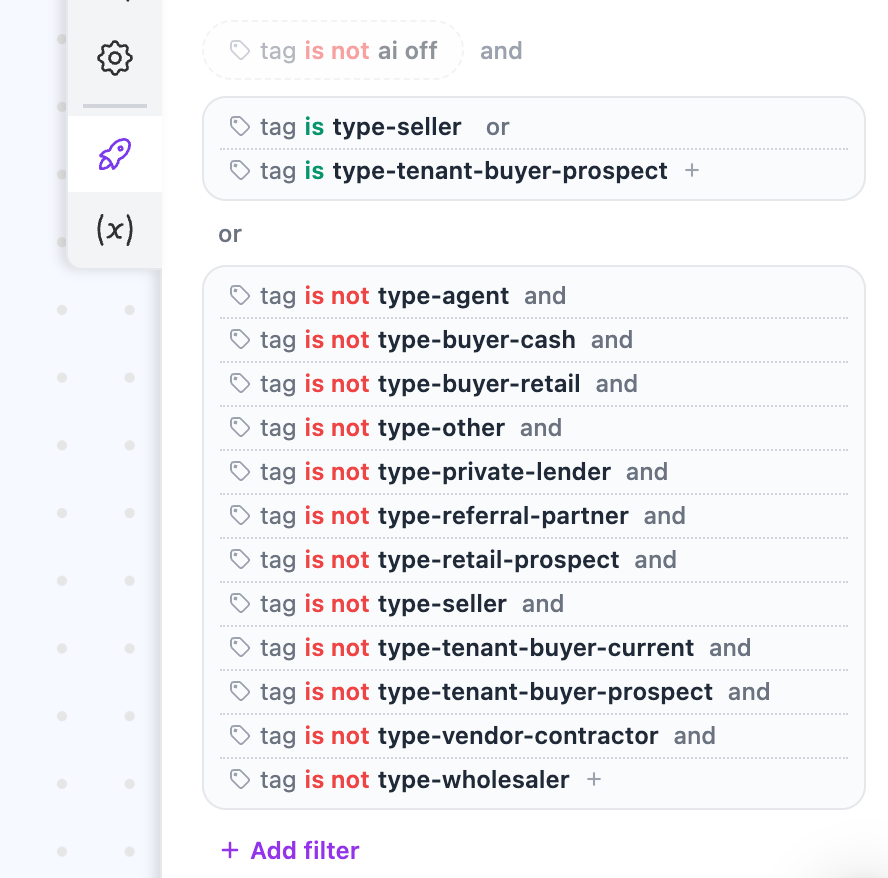
Scenario three is the receptionist case, and for real estate it is the most common one. Somebody texts the number off a bandit sign or a yard sign. They are not in the system, they have no type, and something has to find out who they are before any qualification makes sense.
Building it takes two “is” conditions plus a list of “is not” conditions covering every other type tag. Tedious, and it carries a maintenance cost worth flagging: add a new contact type later and you have to come back and add it to this filter.
Step 3: the node trap that catches most real estate AI builds
Ryan’s original plan was to trigger on everything, use one agent node to figure out the lead type, then branch to separate exits for seller, buyer, agent, and so on.
Here is why that breaks.
Once a contact moves to a new node, they are there permanently. Exit them to the seller node and that is where they live forever. They never return to the categorizing node no matter what you learn about them later.
That matters enormously in real estate, where a contact’s type genuinely changes. The “seller” who turns out to be an agent. The tenant buyer who inherits a property. With filters instead of branches, the tags decide placement on every single message. When the AI figures out mid-conversation that this is a realtor, it updates the contact type, the workflow swaps the tag, and on their next message they stop matching the filters. The bot goes quiet by itself.
One agent node. Let the CRM data do the routing.
Step 4: write the AI instructions like an SOP
The agent node prompt gets broken into sections, exactly the way you would write a standard operating procedure for a new acquisitions VA. Nobody reads a wall of text well, including AI.
Section one: no type found
Check the tags. If there is no type- tag, find out conversationally what kind of contact this is and update the contact type field. Get a full name. Get an email if they will give one, and move on after a couple of tries if they won’t.
Section two: qualifying motivated sellers
Sellers are the most valuable lead, so the instruction opens with a reminder to reassure and listen. AI wants to interrogate. So does every new VA. You have to explicitly tell them to slow down, because a seller calling about a distressed or inherited property is describing a situation before they are describing a transaction.
Then the fields, and only the ones that read motivation:
- Property address (the only mandatory field)
- Timeline to sell
- Why selling
- Condition and repairs needed
- Whether it is already listed with an agent
- Mortgage balance
- Ultimate goal, left open ended
That last one earns its place. “I want to sell and move to Mexico” tells you more about motivation than any dropdown.
One technical note: when you reference fields in your instructions, use the @ mention rather than typing names out. You can get away with “update any fields you think are important,” but accuracy drops noticeably.
Section three: rent-to-own and seller finance buyers
Tenant buyer prospects are the same person whether they came in on a lease purchase listing or an owner-financed one. What changes is the property and the down payment, since owner financing generally wants more down.
The hard part here is not qualification, it is trust. The AI has to nurture enough that someone gets comfortable being honest about their finances: what they have available for a down payment, what other assets they could include or liquidate, whether there is other real estate in the picture. Investigative and warm at the same time, which is a very specific instruction to write and worth spending time on.
Give real estate AI the tools it actually needs
Live property data. The Get Property Details tool takes an address and pulls county records plus a market-adjusted value estimate. For an investor, that means the AI can confirm beds, baths, and square footage back to a seller inside the first few messages. It builds credibility fast, and it occasionally surfaces something useful, like the 1,000 square foot addition that never got permitted and never made the record.
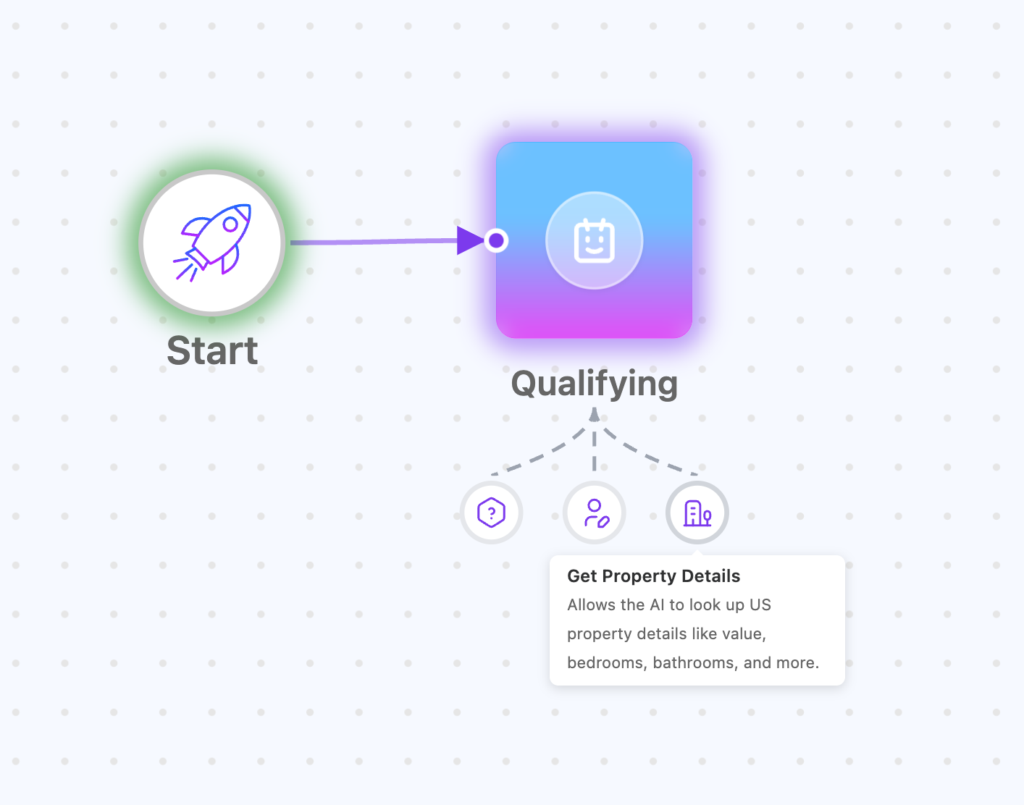
Your current inventory, live. Ryan needed the AI to answer buyer questions about properties available right now. The answer is a Google Sheet in a connected Drive folder with addresses and listing details. Anything you keep current in that sheet updates live, so the agent always knows the inventory. When the sheet does not cover a question, the instruction sends it to the property details tool to look up the address instead.
A tag that makes your phone ring. When a seller sounds motivated, the price sounds reasonable, and the property is not already listed, the AI adds a VIP seller tag and says something honest: “Let me see if I can connect you with Ryan right now.” The tag fires a HighLevel workflow that initiates the call. No promises the AI cannot keep, and if nobody picks up it still falls back to booking.
That combination, motivation detected plus instant call connection, is the closest thing to an AI acquisitions manager most investors will run this year.
Test it before you point it at real leads
The testing portal is where this gets validated. Attach a persona, publish, run the conversation.
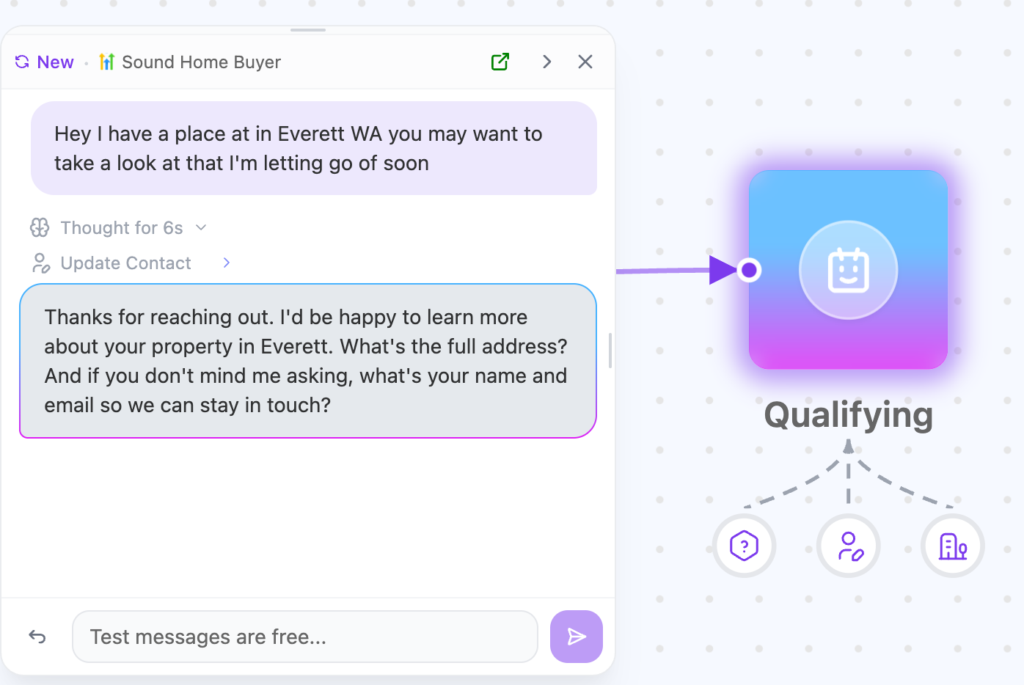
Turn on thinking mode while you are there. The AI explains its reasoning before it sends, which makes troubleshooting far easier, and field update quality improves. You see the thought process on your conversations screen. Your leads do not, unless you deliberately expose it on the website chat widget, which is off by default.
In testing, the agent opened with a clean line, categorized the contact as a seller, flipped the listed field to yes, and pushed property data back into HighLevel.
Three gotchas worth remembering
- Refresh after connecting a source. Fields do not re-pull the instant you connect. If custom fields are missing from your @ mention list, refresh the screen. This one cost Ryan a week.
- New contact types mean editing your filters. Nothing reminds you.
- Filtered-out leads hear silence. Once someone gets tagged as an agent or wholesaler, the AI stops replying and they have no idea why. Add a canned response on that tag so they get “stepping away, someone will be with you shortly” instead of nothing.
FAQ
Yes, and it is one of the better uses of real estate AI because seller qualification is mostly structured questions wrapped in patience. The build above collects timeline, condition, mortgage balance, listing status, and reason for selling, then flags the motivated ones for an immediate call.
Yes. Route on CRM tags rather than branching nodes, and one agent can qualify sellers, nurture tenant buyers, and stay silent on agents and wholesalers.
Natively, along with HubSpot and custom CRMs. Ryan’s entire build ran on his existing HighLevel sub-account with the fields and workflows he already had.
Yes. County data and a market-adjusted value estimate from an address, plus anything you keep in a connected Google Drive sheet of current listings.
Ryan’s took roughly 50 minutes on a live call, starting from a CRM that was already organized.