


- We built live for two different agencies in 1 hour… Lior sells fire training through Instagram DMs off a personal brand. Nathan runs conversational AI across LinkedIn, email, SMS, and web chat for insurance agencies and home service companies.
- Automated lead response is two systems, not one. The reply is the easy half. The follow-up is where the bookings actually come from.
- Set follow-up windows at the source, not in the prompt. Your cadence gets clipped to the hours you allow, so a 4-hour follow-up that lands at 8pm waits until morning by itself.
- Build a second follow-up state with nothing in it. One cadence follows up with the guy who said “not interested” exactly as eagerly as the guy who said “send me times.”
- Name the exact fields and tell it to write as it collects. Otherwise it waits for the full set, the lead ghosts, and you get nothing.
- Decide who it is allowed to answer before you write a word of what it says. For a personal brand that means friends and family. For LinkedIn that means other marketers pitching you.
- Both builds went from empty to testable in under 30 minutes, including the part where I pasted in a garbage calendar ID and watched it fall apart on camera.
Most content about automated lead response stops at “respond fast.” That advice has been repeated for fifteen years, usually citing a study from 2007, and it is not wrong. It just doesn’t do anything productive past the first reply… but the money is made in the follow-up if done correctly.
Nobody publishes the twenty small decisions between “we should respond automatically” and a bot you would let talk to a real lead. Which contacts it answers. Which field it writes to. What happens on the fourth day when the lead has not replied and you have to decide whether that silence means “busy” or “leave me alone.”
We wanted to cut through the b%$ s#$t and put our money where our mouth was in a back to back live build. I posted in our community looking for someone to build for, Lior commented, then Nathan commented, and I told both of them yes. Two builds, half an hour each.
They could not have been more different, and they ended up making almost all of the same decisions. Everyone thinks their business is unique, but almost everyone wants the same things:
- Follow-ups that don’t embarass you
- Leads that get helpful answers
- Qualification criteria
- Booked appointments
What is automated lead response?
Automated lead response is a system that replies to an inbound lead in seconds, qualifies them in conversation, and books them, without a human touching it. The response is only the first half. The second half is automated follow-up, which is a cadence of return messages that runs when the lead goes quiet, and a rule for when to stop.
The follow-up is where the biggest opportunity is, and the part that most people mess up.
Most tools sold as automated lead response are really just auto-responders. They fire once, the lead does not reply, and the system considers its job done. Across 1.1 million appointments booked through CloseBot, that assumption is where the money leaks out:
- Just over half of bookings land outside 9 to 5 in the lead’s local time. About 11% arrive between midnight and 6am.
- The average booking takes roughly 132 messages, counting inbound messages and the leads who never answered.
- One lead booked 355 days after first contact, off an AI Agent sequence that never gave up.
Build one: Lior, Instagram DMs, and a personal brand full of friends
Lior teaches people to eat fire. Not a metaphor. He does it full time, he sells online training with ongoing support, and in November he is teaching me to do it too, because I lost a bet on Facebook 😅
His lead flow is Instagram. People comment a trigger word, reply to an ad, or DM him after a new follow. HighLevel picks up the comments and DMs. And because it is his personal account, that same inbox holds his friends, his family, story reactions, and spam.
His first sentence about the build was not about response speed. It was: “Automation versus personalization, that’s the main thing.”
Decide who it may answer before you write what it says
Every automated lead response build has a population problem hiding in it. Lior’s is friends. Nathan’s, as you will see, is other marketers.
We wrote the first section of his agent node as a classifier rather than a responder. Two contact types: leads, and friends and family. Do not reply to friends and family. If someone looks like a friend or family member, apply a personal tag. If a message needs his attention personally, apply a notify tag so a GoHighLevel workflow can ping him.
Two things worth stealing from how that got written (see 09:15 in the video):
Tag actions. An instruction like tag them as “personal” is a hope. @Update Tags naming the tool explicitly, then the tag, is an instruction that’s more precise. We consistently see better tool use when the tool is called out by name inside the sentence that needs it.
Anything you can make deterministic, make deterministic. Prompt-level filtering is a judgment call the model has to get right Tag-based reply filters at the source level are code. If your real leads always arrive carrying a tag from a lead form or an ad, filter on that tag and the bot will never see your friends at all. See how to use tag filtering to make sure your bot never replies to certain leads here.
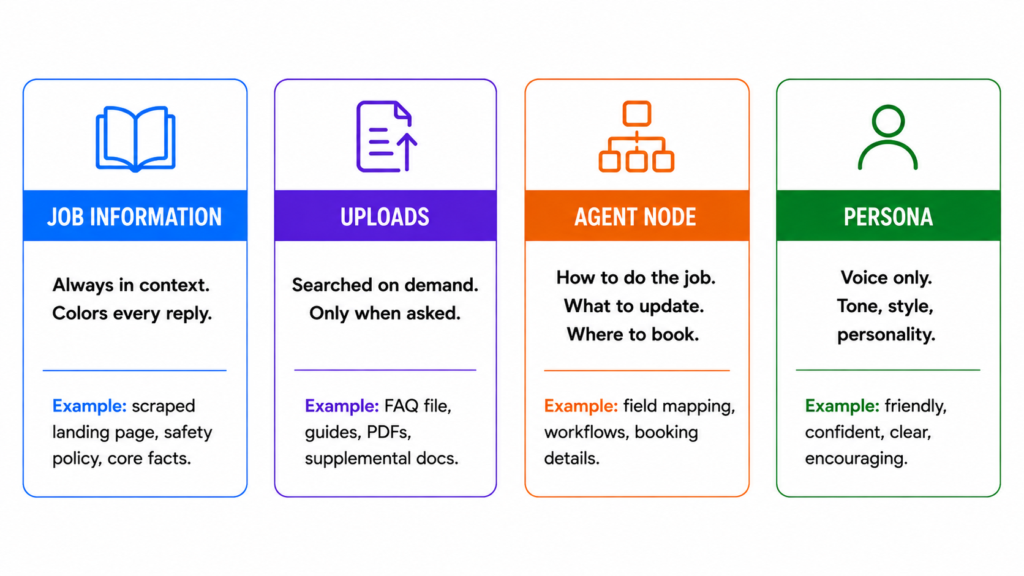
Job information, uploads, and persona are three different drawers
- Job information is what the agent should know without being asked. It is always in context and it colors every reply. We scraped his landing page into it as a starting base.
- Uploads are what it should know only when asked. It searches them on demand. During testing, someone asked about learning online being dangerous, and the agent went and found his FAQ file. That is exactly the intended behavior.
- Agent Node Instructions. This is where the details should go about exactly how to do the job at hand, which fields to update, where to book, etc.
- Persona is voice only.
Keep one source of truth per fact. The model handles duplication fine. You will not. Six months from now you will update your pricing in one drawer and forget it lives in the other.
After watching the test, Lior moved his safety material up into job information, because “we do not share fuel types, it is dangerous” is not a question he wants the agent to have to go look up. Correct call.
Light qualification, exact fields, and the three words that matter
Lior’s qualification is genuinely light: do they have experience, what do they want to learn, are they doing this professionally or for fun.
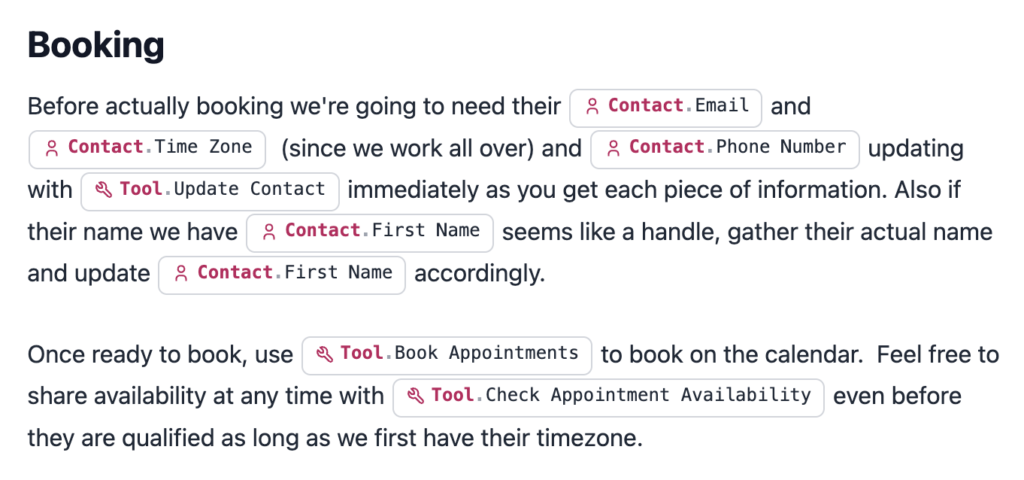
We pointed each of those at a named field in his account, at-mentioned so the agent could see both the field and its current value. Then the sentence that does the real work:
When you get any of the information above, update the appropriate field right away with
@Update Contact.
Without right away, agents commonly wait until they have collected everything before writing anything. A lead who answers two questions and then goes quiet leaves you with a blank record.
One more Instagram-specific rule we added: profile handles are frequently not names. If the display name looks like a human name, use it. If it looks like a handle, ask them to confirm first and last name before booking.
And on time zones, Lior asked whether he could just ask for a state instead. You can, but several US states span multiple time zones, so you are trading a small friction for a wrong-time booking. If you do ask for state, tell the agent to drill in and ask specifically when that state is ambiguous.
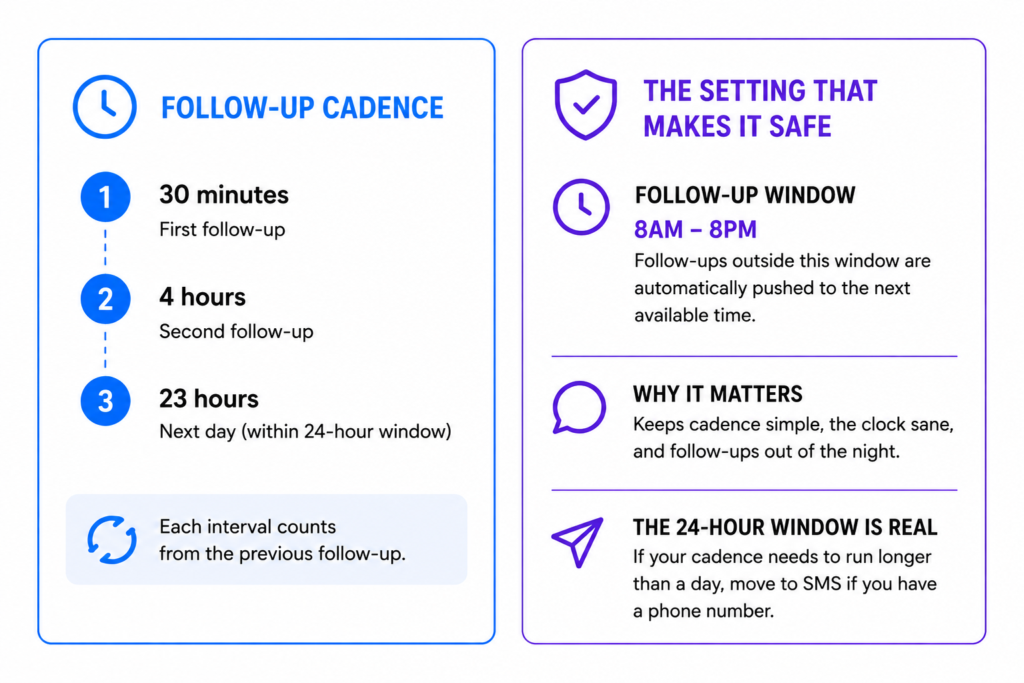
The follow-up cadence, and the setting that makes it safe
Here is where Lior had thought hardest, and where most builds are thinnest.
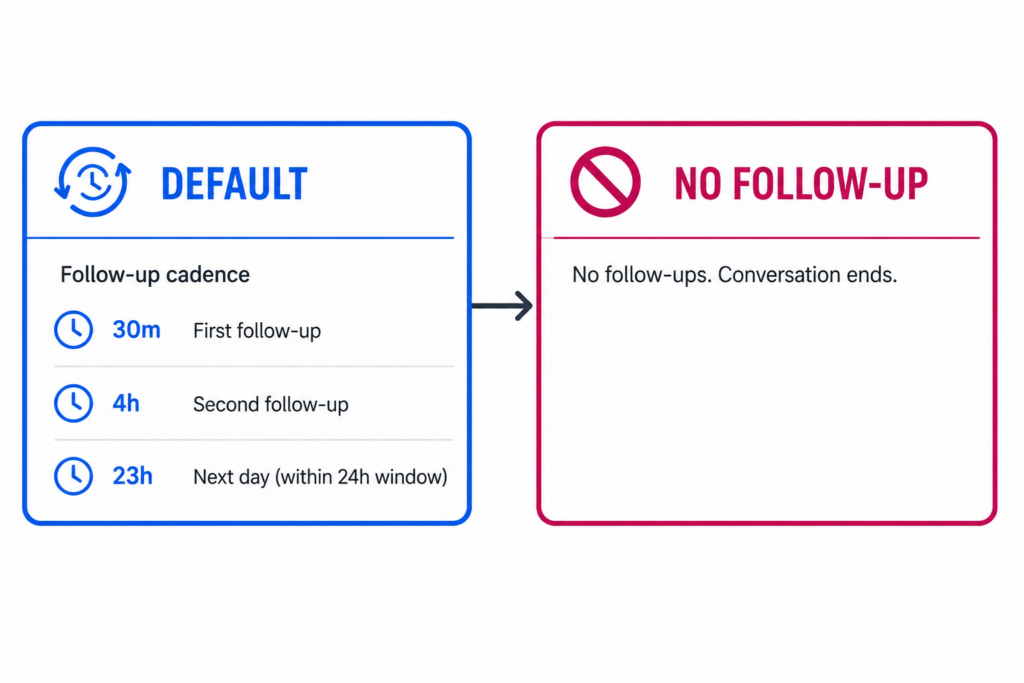
By default there are no follow-ups. Nothing happens. You have to build a follow-up state, which is just a cadence of return messages.
What he wanted:
- First follow-up at 20 to 30 minutes if they do not answer
- Then around 6 hours
- Then the next day, roughly 23 hours, because Instagram gives you a 24-hour window to message someone
- But not in the middle of the night
That last constraint is the one people try to solve inside the prompt, and it does not belong there. Follow-up windows live in your source settings. Set them to 8am through 8pm and a 4-hour follow-up that would have landed at 8:40pm gets pushed to the next available morning slot automatically. The cadence stays simple, the clock stays sane, and you are not asking a language model to do timezone arithmetic on every message.
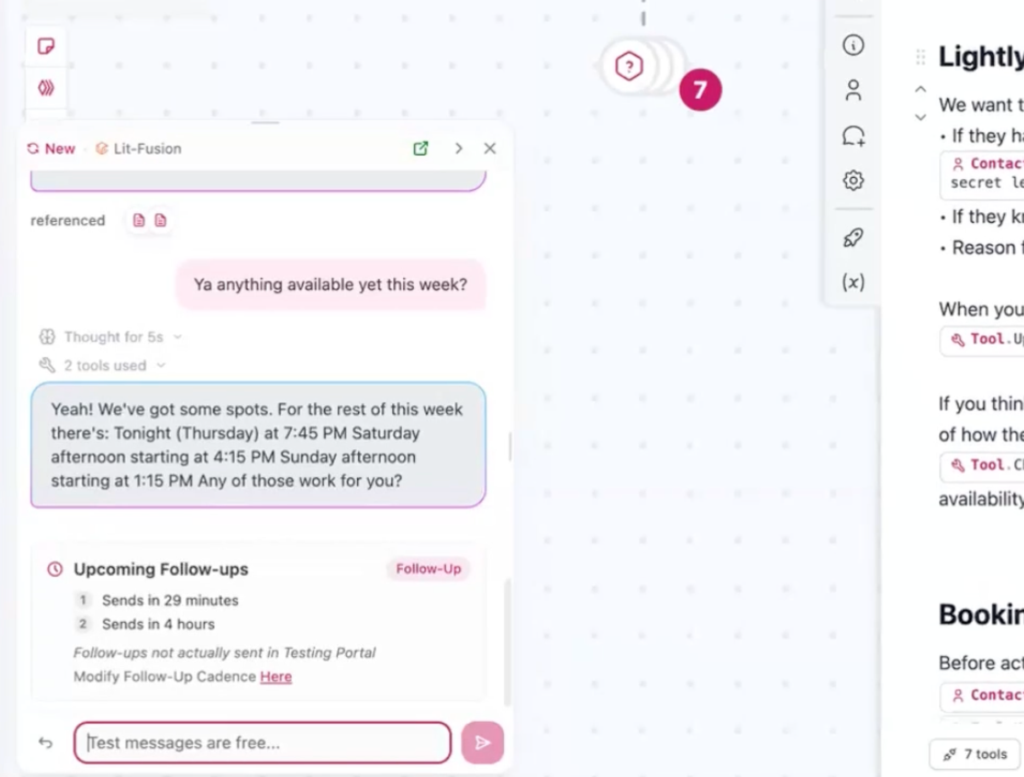
We landed on 30 minutes, then 4 hours, with the window doing the rest. Note that each interval counts from the previous follow-up, not from the first message.
Meta’s 24-hour messaging window on Instagram and Messenger is a hard constraint worth planning around. If your cadence needs to run longer than a day, it needs somewhere to go. If you captured a phone number, your CloseBot-built agent will automatically move the conversation over to SMS rather than let the sequence die inside the window. No other platform does this gracefully.
The state that stops, and the state that adapts
Lior described his current workaround: when someone says “I’ll get back to you,” he goes in and switches the AI off manually, because otherwise it keeps following up on schedule. That workaround is the tell. It means the system has one cadence and no opinion.
Two things fix it.
Smart follow-ups. When a lead says something like “I’m at work right now, I’ll get back to you,” the agent will generally reschedule its own next touch rather than firing at the preset interval. It is on by default in the Agent Node. It does not apply if you are still building with objectives, which is one of the better reasons to migrate.
A second state with nothing in it. We created a no follow-up state, left it empty, and told the agent when to switch:
Follow-ups: if this person is a friend, family, or they are not interested, or it would be awkward to follow up, set
@No Follow-Up.
“If it would be awkward to follow up” is vague on purpose. It is the kind of judgment you would trust a decent assistant to make without a rulebook, and it catches the cases you would never think to enumerate. It is also the single line that separates a bot people compliment from a bot people report.
Every conversation starts in the default state. You only have to teach it when to leave.
Test with what people actually send you
When we ran the test, Lior did not give me a clean scripted lead. He gave me the two messages he actually gets: “what fuel are you using,” which he will never answer publicly, and “learning online sounds dangerous.”
The agent handled both by searching his uploads, and it updated his contact record to no experience, complete beginner on the way through. It also checked availability across both calendars without being asked to.
It did miss one thing. It went to book without collecting a time zone, because we had told it that time zone was required before booking but had not said it clearly enough. That is a fifteen second fix, and you only find it by testing. See how we fixed it live at 37:29 of the video.
Turn on thinking mode while you are tuning. You get better reasoning and, more usefully, you get to read why the agent did the thing you did not like.
Build two: Nathan, one agent across many client accounts
Nathan’s build has a completely different shape. He works with insurance agencies primarily, plus home services like roofing, plumbing, and electrical. His outbound already runs elsewhere. Cold outreach and database reactivation go out asking a question designed to get a reply, and the moment someone replies, the conversational AI takes over across LinkedIn, email, SMS, and web chat.
So for his purposes, every conversation is inbound.
His agent has two jobs: ask two to five questions to surface a pain point using an NEPQ-style approach, then use that pain point as the reason to book a 15-minute intro call. Contact data is already verified upstream, so there is nothing to qualify in the traditional sense. He is not filtering. He is finding the reason.
One job flow, many sub-accounts, all the variables
The structural decision in Nathan’s build is that this agent has to work for many client accounts at once.
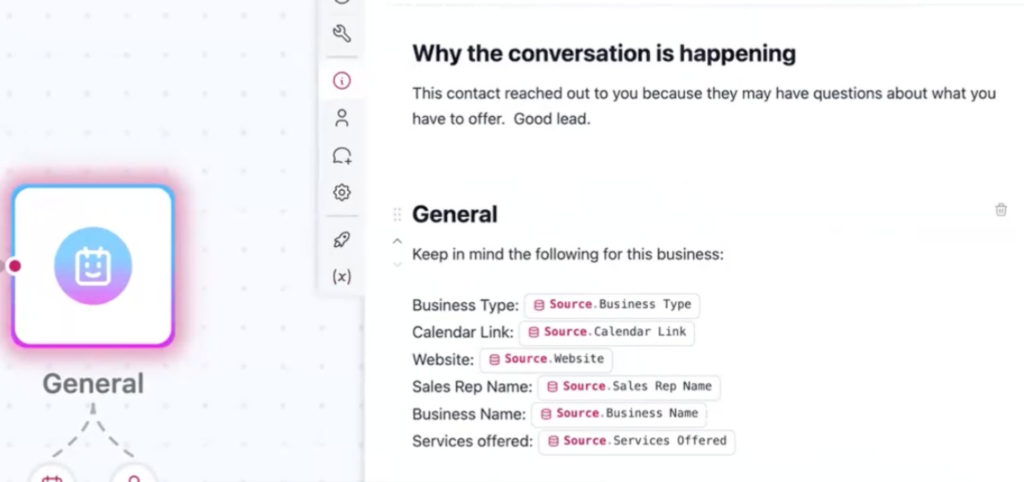
That is what custom values are for. Sales rep name, website, calendar link, business name, services offered. One agent node, one job flow, unlimited connected sub-accounts, and the values swap per account. Change the flow once and it reflects everywhere.
We added one he was missing: business type. “Services offered: repair and install” does not tell the agent whether it is a roofer or a plumber, and that changes how it talks about the problem.
The constraint worth understanding before you scale: anything referenced as a variable has to live in the job flow, not the persona, because a job flow gets one persona. Lior spotted the operational consequence immediately, and it is the right thing to worry about. Once you have live client accounts running on a shared flow, you stop editing the flow and start editing variables. So decide up front which parts are per-client, and make those variables while it is cheap to do.
On LinkedIn, your spam problem is other marketers
Nathan’s version of Lior’s friends-and-family problem: on LinkedIn, plenty of inbound messages are other agencies pitching him.
Same solution, different criteria. The agent replies to people who responded to something his team sent. Cold inbound pitches get no reply at all, and no follow-up state.
30 minutes, then 12 hours
Nathan’s cadence is simpler than Lior’s: first follow-up at 30 minutes, second the next day at 12 hours, with the same source-level follow-up window so nothing fires overnight.
Then the same no-follow-up state, with the switching rule folded into his general handling section: if they end up clearly uninterested, or if following up would be awkward, switch to no follow-up. Spammers get no reply and no cadence.
Two different businesses, two different first intervals, identical architecture. That is the pattern worth taking.
Smart FAQ, and a genuinely open question
Nathan raised the sharpest question of the call. When the agent hits something it cannot answer, should it use that gap as the reason to book the call?
It is a tempting move. “Great question, that is exactly what the call is for.”
The tradeoff is that you never find out what your leads are asking. Smart FAQ pings you when the agent does not know something, you type the answer once, and it goes live, with the option to send it back to the lead who asked. Rather than guessing at an FAQ before launch, your leads write it for you.
Nathan thought about it for a second and chose the ping, plus a path to hand off to a human when the agent gets stuck. I think that is right for most builds. The unknown-as-booking-reason play works, but it works better once you actually know what you are choosing not to answer.
The follow-up rules both builds ended up with
Strip away fire eating and insurance and both builds converge on the same six decisions.
- First follow-up inside 30 minutes. Both landed there independently. It is early enough to catch the lead still holding their phone.
- Second touch in hours, third in a day. Lior went 4 hours, Nathan went 12. The exact number matters less than the shape, which is tightening early and widening later.
- Set the allowed hours at the source, not in the prompt. Then a cadence can be simple, because the window handles the clock.
- Always build a second state with nothing in it. And teach the agent to switch when a lead is uninterested, disqualified, or when following up would just be awkward.
- Let smart follow-ups handle “not right now.” A lead who says they are busy should not get the same interval as a lead who said nothing.
- Plan for the long tail. Our own data has a booking at 355 days. Every default 30-day sequence we see configured expires before that lead ever gets a second chance.
One compliance note that applies to both. Depending on where your leads are, your first message may legally need to disclose that it is automated. Lior raised this himself and is right to be thinking about it. We wrote up the current EU and US disclosure requirements here. If your outbound fires from your CRM, the disclosure belongs in that template, not in your bot.
What to copy this week
If you have an automated lead response setup already running, four checks, in order of how much they usually cost you:
- Do you have a no-follow-up state, or does everyone get the same cadence?
- Are your follow-up windows set, or can your bot text someone at 3am?
- Does your prompt name exact fields and say to update as it collects?
- Does the bot reply to people it should never have replied to?
If you want yours built live, come tell us what you are working on. Or read the full 1.1 million appointment benchmark report first, since most of the arguments above trace back to it.
Frequently asked questions
Automated lead response is a system that replies to an inbound lead within seconds, qualifies them conversationally, and books a meeting without human involvement. A complete system also includes automated follow-up, meaning a scheduled cadence of return messages when the lead goes quiet, plus an explicit rule for when to stop contacting them.
Immediately, in seconds rather than minutes. Industry research has anchored the benchmark at five minutes for over a decade, while average business response times still run 29 to 47 hours. The larger opportunity is coverage, not speed alone. Just over half of appointments booked through CloseBot land outside 9-to-5 hours.
A workable default is a first follow-up within 30 minutes, a second in 4 to 12 hours, then a third the next day, widening after that. Both agencies in this build session chose 30 minutes for the first touch independently. What matters more than the intervals is having a rule for when to stop entirely.
Set follow-up windows in your source settings rather than writing time rules into the prompt. If a scheduled follow-up falls outside the allowed hours, the system holds it until the next permitted time automatically. This keeps your cadence simple and avoids asking a language model to perform timezone arithmetic on every message.
A follow-up state is a named cadence the agent can switch between mid-conversation. Most builds need two: a default cadence, and a second state containing no follow-ups at all. The agent switches to the empty state when a lead is uninterested, disqualified, or when following up would simply be awkward.
Longer than the 30-day default most teams configure. In CloseBot’s data covering 1.1 million appointments, one lead booked 355 days after first contact from an automated sequence that never stopped. Measure your follow-up window in months, and route long cadences to SMS or email where messaging windows do not expire.
Filter with tags at the source rather than instructions in the prompt. If every genuine lead arrives carrying a tag from your lead form, ads, or CRM, reply only to contacts holding that tag. A filter is deterministic. A prompt instruction is a judgment the model must get right on every message, forever.
Yes. Use custom values for anything that differs per client, such as business name, sales rep, services offered, business type, website, and calendar link, then connect unlimited sub-accounts to the same job flow. One edit propagates everywhere. Plan which details are per-client before you scale, since variables are cheap to add early.
Yes, within limits. Meta allows a 24-hour messaging window after a lead’s last message, so any cadence extending past a day needs somewhere else to go. If you captured a phone number during the conversation, move the follow-up to SMS rather than letting the sequence expire inside the window.
Only the specific fields you name, and it should write to them as it collects each answer rather than waiting to finish. Naming exact fields prevents an agent from guessing at a similar-looking field and overwriting good data. Writing immediately preserves partial answers from leads who reply twice and then disappear.