


Make sure you sign up for the live launch webinar here!
Most AI appointment setter reporting stops shallow… doing just enough to make a pretty dashboard that doesn’t help you do anything useful. Messages sent, messages received, maybe a booking count if you are lucky. That tells you the machine is running. It tells you nothing about whether it is running well, which makes it difficult to convey value to your clients (and yourself honestly).
This is not a small problem. MIT’s Project NANDA analyzed 300 enterprise AI deployments and found that 95% of pilots produced no measurable impact on profit and loss. The figure has been fairly criticized. A pilot counted as a failure if it could not show P&L impact roughly six months in, which is a narrow bar for a technology being deployed at speed. The same study found that AI budgets skewed heavily toward sales and marketing, which is to say the money went exactly where our category lives, and mostly could not produce a receipt.
We ran into the ceiling ourselves. When we published our benchmark study of 1.1 million booked appointments, we had to write custom queries against our own platform to get the answers. Half of bookings landing outside business hours, Sunday leads converting with 14% fewer messages, one lead booking 355 days after first contact.
None of that was sitting in a dashboard waiting for us. I had to bug the dev team to pull it for me with custom queries… annoying for all of us.
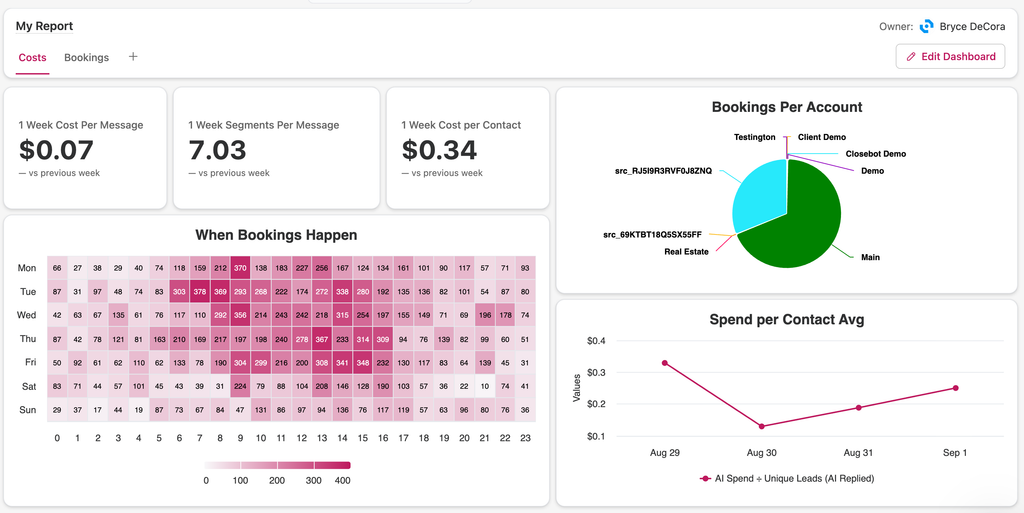
So we built these kinds of capabilities into our dashboards and launched a beta program. On September 24th, the CloseBot Analytics add-on goes live. It qualifies and scores leads automatically, tracks sentiment across the whole conversation, split tests personas against real outcomes, and reports all of it on dashboards you build yourself (or from our templates to help show you what’s possible).
Here are the 4 things releasing all at once as a single add-on👇
Lead Scoring: AI Appointment Setter Scoring, per source
Lead scoring in CloseBot is configured at the source level, which means the rules follow the campaign rather than being bolted onto the whole account. You may have some accounts that value different lead activities differently than others. This gives you flexibility to score based on what’s important to each.
You define what a point is worth. Some examples of the kind of rules people will set up on day one:
- +1 for any positive reply
- -1 for any negative reply
- +5 for a booked appointment
- +1 for each website page visit
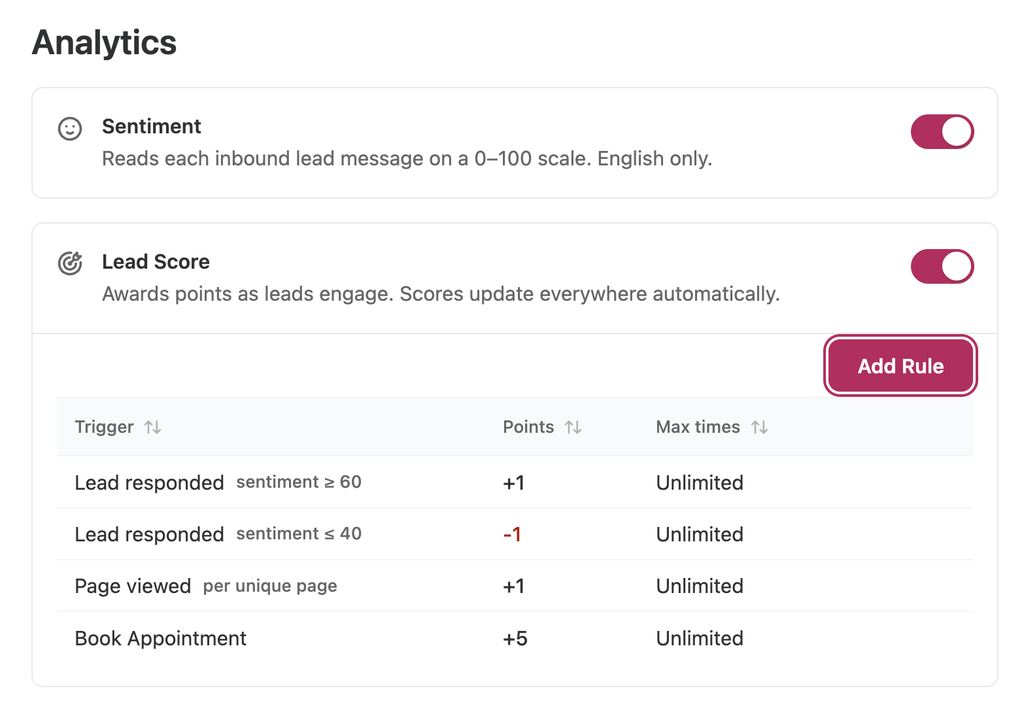
That last one matters more than it looks. Page visit signals come in from tracking, which means a lead who replied politely once but has since read your pricing page four times outranks a lead who replied enthusiastically and then vanished.
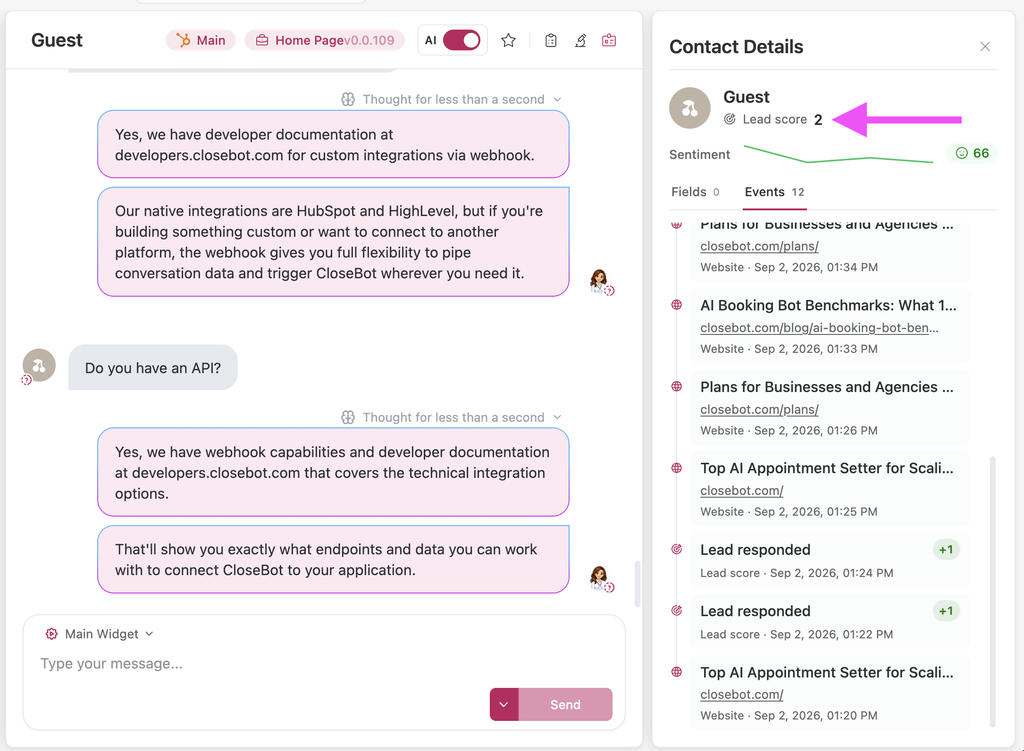
The score lands on the contact card, so it is visible where your team already works instead of buried in a reporting tab nobody opens.
What this fixes: right now, most teams treat every lead the AI books as identical, and every lead the AI does not book as garbage. Neither is true. A scored pipeline means you can hand your closers a ranked list, and it means you can finally answer the client question that has no good answer today, which is “are these leads any good.”
Sentiment Tracking: watch the mood move
Sentiment gets tracked across the whole conversation journey, which allows you to easily see the mood trend leads have over time while engaging with your agents.
That means you can see whether leads engaging with different agents are more or less likely to get upset. See which days have the happies leads. See whether a contact got happier or angrier as the conversation went on… A lead who starts skeptical and warms up is a completely different situation from a lead who starts warm and sours at message four, and today those two look identical in every report you have access to.
The angry-at-message-four pattern is the valuable one, because it usually is not random. Is it a specific question your bot handles badly, or a qualifying question that lands wrong, or a follow-up cadence that reads as pushy? Sentiment tracking turns that from a vague suspicion into something you can point at.
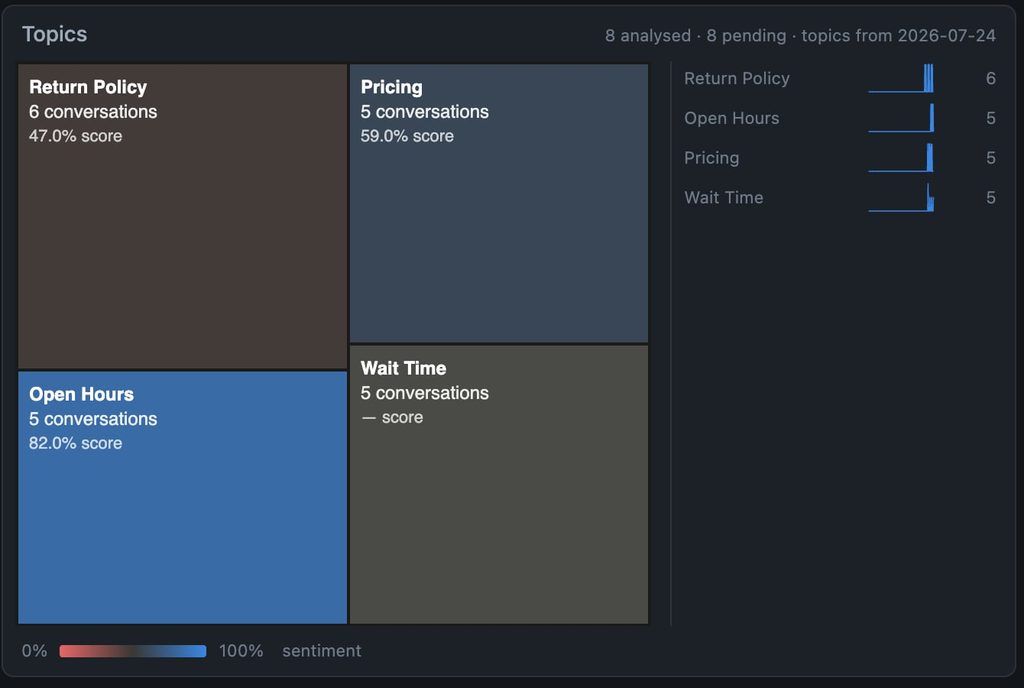
This becomes even more useful when using our Topic chart to display discussed topics and the general sentiment around each… for example, are they unhappy when discussing your return policy? Maybe you want to dive into those specific conversations to see what they dislike about your policy. 👇
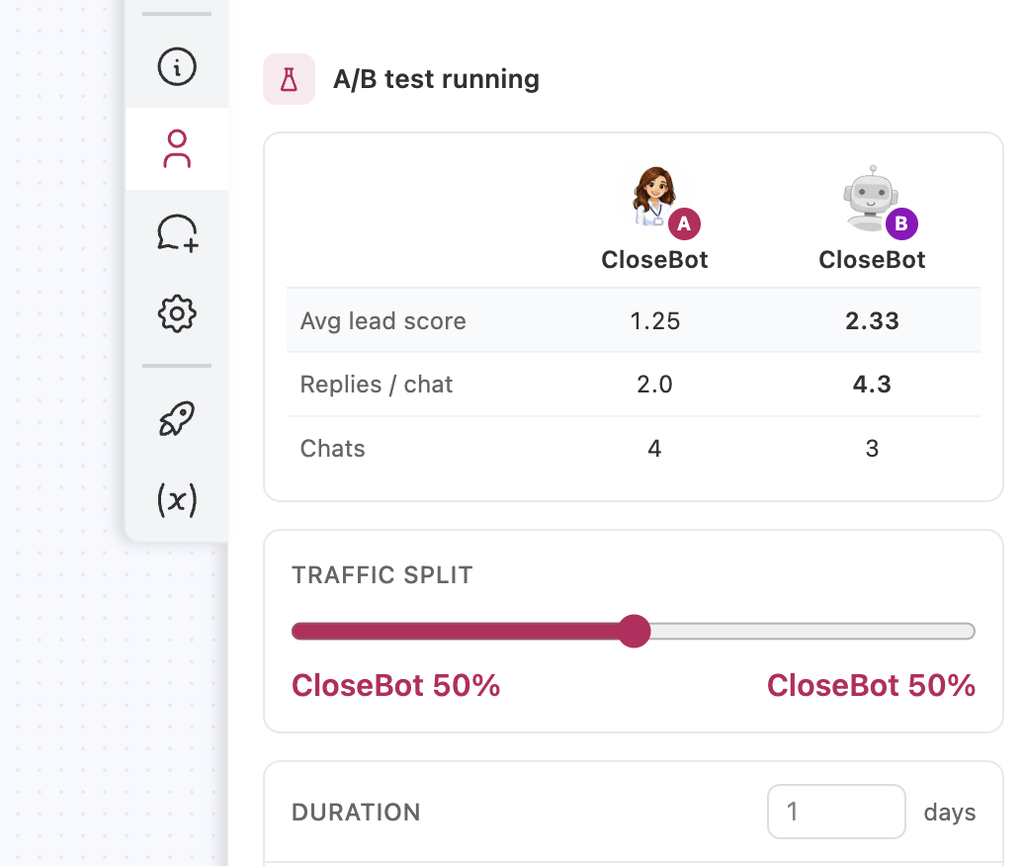
Persona A/B Testing: settle it with data instead of opinions
Persona split testing gets a real scoreboard instead of just guessing which changes have positive effect.
Run two personas against each other over a set time range, and the winner is chosen on average sentiment or average lead score, not on which one you liked reading. After however many days you set the test to run, the winner is auto-selected.
Things worth testing on that: tone, how aggressive the qualifying is, and AI provider options… That last one is the interesting one, because “which model books more appointments” is a question the entire category currently answers with opinions instead of fact. You may like OpenAI more, but maybe your Anthropic test outperforms it!
This is also the honest answer to a question we get constantly, which is what the best prompt is. There is no best prompt. There is a best prompt for your source, your offer, and your audience, and now you can find it in a week instead of guessing for a quarter.
For what it is worth, this is one of the more thoroughly measured effects in business research. An MIT study of 179 large firms found that the ones making decisions from data rather than instinct produced output and productivity 5 to 6% higher than their own technology investments predicted, with the same pattern showing up in return on equity and market value. Not because data is magic. Because the alternative is whoever has the strongest opinion in the room winning by default, and that person is wrong a meaningful percentage of the time.
Custom Dashboards: report on what matters, to humans and to AI
This is the bulk of the update, and it comes in two halves. The metrics, and who gets to read them.
These are the metrics we will immediately have available to build dashboards from (as well as filters for each):
Volume
- Total outbound messages (every message sent to leads, including ones sent by humans)
- AI Replies (messages sent to leads by a bot)
- Total inbound messages (every message received from leads)
- Followups sent
Pipeline
- Unique leads (every lead created, including those with no bot reply)
- Unique leads with AI reply
- Bookings
- Lead score average
Quality
- Conversation sentiment
- Average reply time
- Topics explorer (topics discussed with contacts, plus the sentiment average per topic)
Cost and margin
- AI spend (raw AI provider spend)
- Cost (what was billed in AI usage)
- AI segments (with Agent Node unlocked, one message can equal more than one segment)
Knowledge
- Tool uses
- FAQs added
- Knowledge base references
- Documents referenced
Formula
- Any combination of the above with custom math applied, for example AI replies divided by bookings
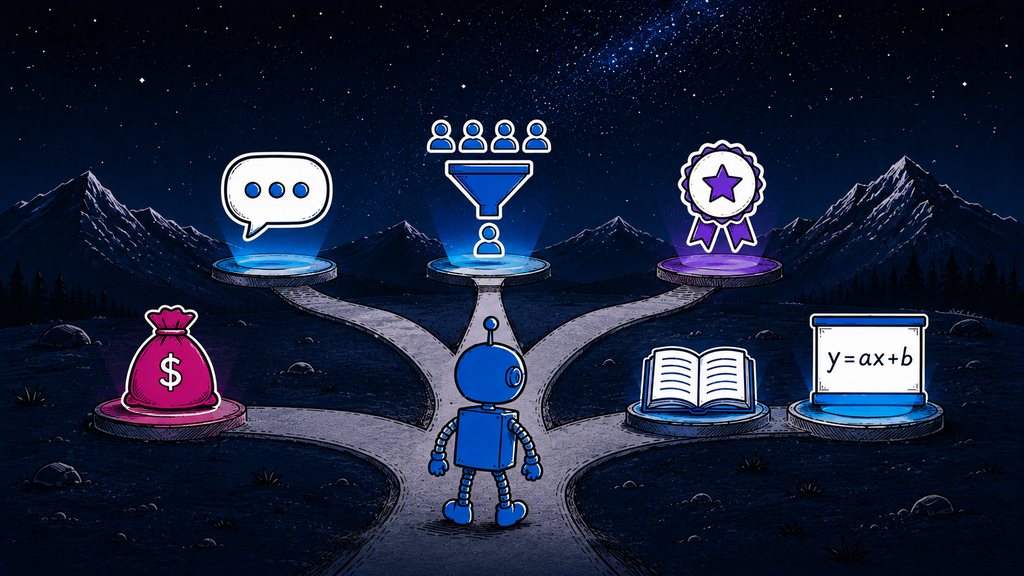
A few of these deserve calling out.
AI Spend per Booking monitor your average spend per booked appointment, if ai appointment setting is what you’re all about. Easily see how this changes over time or whether it differs on different days of the week.
Topics explorer is the one people will underestimate. It shows what leads are actually talking about, with sentiment averaged per topic. Which is to say: it tells you which subject makes your leads unhappy. If pricing comes up in 40% of conversations and carries the worst sentiment of any topic, that is not a bot problem, that is an offer problem, and you just found it without reading 3,000 transcripts.
Knowledge base references and documents referenced answer whether the material you loaded is doing anything. Most knowledge bases are 60% dead weight and nobody knows which 60%.
Formula exists because we cannot predict your metric. AI replies per booking, cost per booked appointment, follow-ups per conversion, sentiment per dollar spent. Build the one your client asks about.
Built as endpoints first, so your AI can read it too
Every one of those metrics ships as an API endpoint. We will discuss the importance of our API and how this ties into our future MCP release.
Why? Dashboards are for humans, and humans are increasingly not the ones reading the reports. You are going to want to ask Claude to look at last month’s numbers across nine client sub-accounts and tell you which two are underperforming and why. Your ops person is going to want a GrokBot in Slack that answers “how did the roofing client do this week” without opening CloseBot at all.
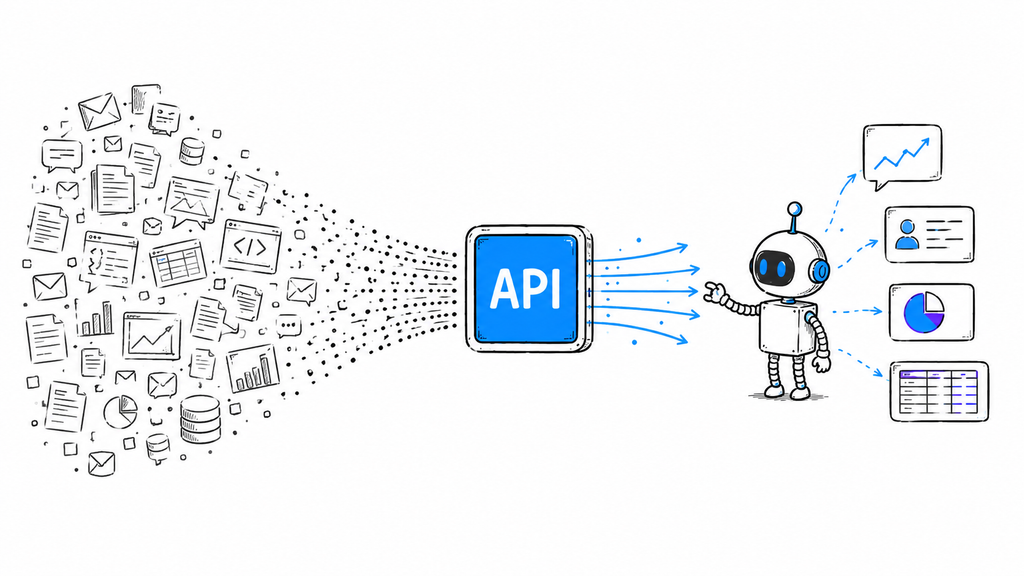
That only works if the data is reachable programmatically, with clean definitions, at a real endpoint built for that purpose. So the API comes first and the visualization sits on top of it. All of these endpoints are set up for AI-first, unlike the raw endpoints your CRM offers that don’t allow your AI to make large-scale inference.
Which sets up the next thing on our roadmap. We are building a CloseBot MCP server, targeting November, and analytics is the reason it is scheduled in that order. MCP is the tool your agents use to understand… The endpoints are the foundation. Building the MCP first would have given us a nice demo with nothing underneath it, and we have opinions about shipping in that order.
So… September 24th gets you the dashboards and the endpoints. Your preferred AI Assistants can use those endpoints immediately, but they will get even better once our MCP is released in November.
“Alexa, look at which days get the most booked appointments and the typical topics discussed on those days and set up an A/B test to try to get those topics discussed more often across the other days for my roofing client accounts”
Why analytics, and why now
Quick note on how this got picked, since we wrote a whole post recently about building the features you need instead of the features you want.
Analytics was not our most requested feature. Feature requests describe today’s pain in the vocabulary of the tool people already have, which is why the top of every request list is a slightly faster version of something that already exists.
But every serious conversation we have with an agency eventually arrives at the same wall… they can prove the bot is working, but they cannot prove it is working well, and they cannot prove which client, which source, or which persona is carrying the results. That is a measurement problem. You cannot optimize a thing you cannot see, so every month you run without instruments is a month of decisions backed by your gut instead of being backed by data.
It is also where the native tooling in most CRMs gives up entirely, which we covered in the HighLevel Conversation AI comparison. Activity reporting is easy and everybody has it. Outcome reporting is hard and almost nobody does.
Come see it live on September 24
The full walkthrough happens on the launch webinar. Live build, real dashboards, real data, and the add-on pricing announced on the call.
Bring the metric you have been trying to report on and could not. We will build it on the call.
Frequently asked questions
The CloseBot Analytics add-on is a paid feature set launching September 24, 2026 that adds lead scoring, conversation sentiment tracking, persona A/B testing and custom dashboards to CloseBot. It reports on outcome metrics like bookings, lead score average, sentiment and cost per booking rather than message activity alone, and every metric is available as an API endpoint as well as a chart.
CloseBot Analytics launches on September 24, 2026, alongside a live webinar where the feature set is demonstrated and the add-on pricing is announced. The same date brings unlimited uploads, unlimited user seats and unlimited job flows to every CloseBot plan, including Business plans.
CloseBot lead scoring uses rules you define at the source level, so each campaign scores leads on its own terms. Typical rules award +1 for a positive reply, -1 for a negative reply, +5 for a booked appointment and +1 for each website page visit. The resulting score displays directly on the contact card where sales teams already work.
Yes. CloseBot’s analytics add-on allows detailed reporting capabilities both via our UI and via API (for AI Agents).
Conversation sentiment tracking measures how a lead’s mood changes across the entire conversation journey rather than scoring it once. In CloseBot, this shows at a glance whether a contact grew happier or angrier over time, which separates a skeptical lead who warmed up from a warm lead who soured at a specific message. That pattern usually points to a fixable question or cadence.
In CloseBot, you run two personas against each other for a time range you set, and the winner is selected automatically based on average lead score or average sentiment. This lets you test tone, qualifying aggressiveness, follow-up persistence and different AI provider options against booking outcomes instead of choosing a persona based on which one reads better.
CloseBot custom dashboards cover total outbound messages, AI replies, total inbound messages, followups sent, unique leads, unique leads with an AI reply, bookings, lead score average, conversation sentiment, average reply time, AI spend, billed cost, AI segments, tool uses, FAQs added, knowledge base references, documents referenced, a topics explorer with per-topic sentiment, and custom formulas combining any of these.
Yes. Every CloseBot Analytics metric ships as an API endpoint alongside the dashboard view, so AI assistants can query the data programmatically through the CloseBot API. A dedicated CloseBot MCP server is targeted for November 2026, which will let assistants like Claude query analytics conversationally across sub-accounts without direct API work.
Not yet. CloseBot is building an MCP server targeted for November 2026, deliberately scheduled after the September 24 Analytics release because MCP is the interface and the analytics endpoints are the underlying data layer. Until then, the same metrics are accessible through the CloseBot API for anyone building AI-driven reporting.
An AI segment is CloseBot’s billing unit for messages. One message equals one segment by default. If Agent Node is unlocked, which removes limits on instruction size and tool count, billing shifts to token cost, so a single message can consume more than one segment. AI segments are a reportable metric in Analytics so the effect is visible per source.
Pricing for the CloseBot Analytics add-on has not been finalized and will be announced live during the September 24, 2026 launch webinar. It is priced as an add-on to existing CloseBot plans rather than bundled into base pricing, and it arrives alongside the removal of seat, storage and job flow limits across all plans.